



Refunds: giving money back
Record money returned to a customer, by any method. A refund in Voyant is a record of what you did, not an instruction to a card machine.
A trip gets cancelled, a customer drops out, you agree a goodwill gesture. Money goes back.
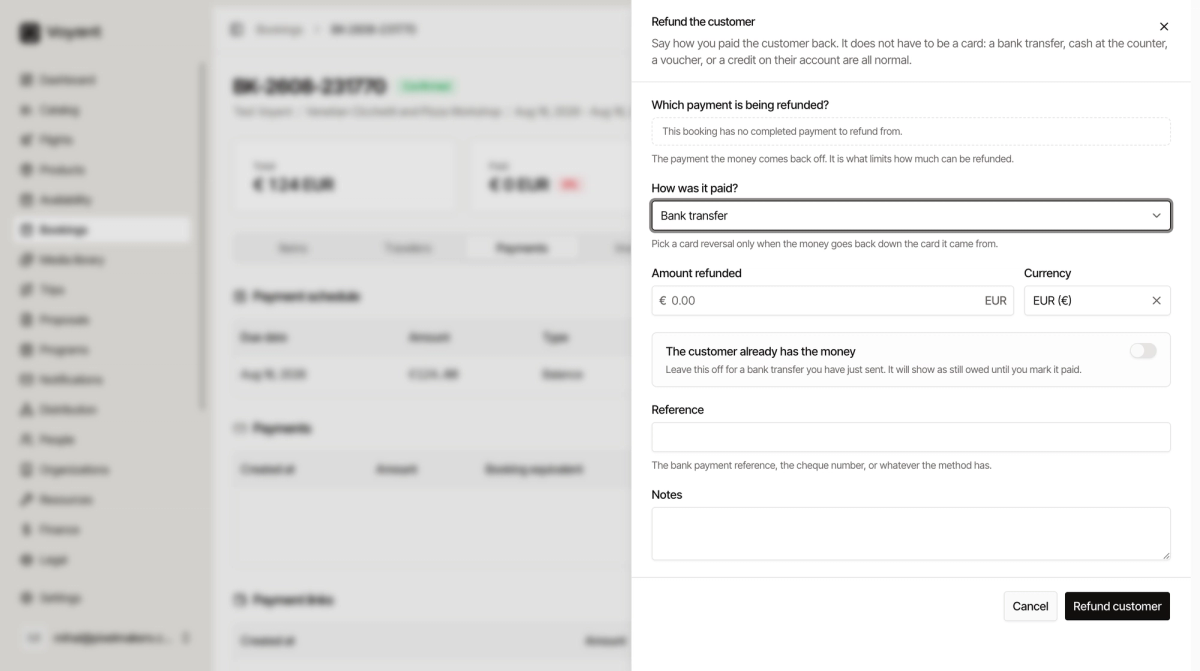
The Refunds panel is where you say what you paid back and how. As the panel itself puts it, a credit note says you owe the customer money back, and this is where you say you paid it.
It does not have to be a card
This is the part people get wrong. A refund does not mean reversing a card payment. A bank transfer, cash at the counter, a voucher, or a credit on their account are all normal ways to refund somebody.
Steps
- Open the booking and go to Payments.
- Click Refund customer.
- Choose Which payment is being refunded. This is what limits how much you can give back.
- Choose How was it paid.
- Enter the Amount refunded.
- Set The customer already has the money if they do.
- Add a Reference and a Note.
- Click Refund customer.
The methods
Bank transfer, Card reversal, Cash, Cheque, Travel credit, Voucher, Credit against their account, and Other.
Pick Card reversal only when the money genuinely goes back down the card it came from. If you are sending a bank transfer instead, say bank transfer.
The toggle that catches people out
The customer already has the money is off by default, and that is usually right.
Leave it off for a bank transfer you have only just sent. The refund shows as still owed until you come back and mark it paid, which is accurate, because the money has not landed yet.
Turn it on when they walked away with cash in hand.
If there is nothing to refund
If the booking has no completed payment, the panel says so. You cannot refund money you never received.
If a customer cancels before paying anything, there is nothing to refund. Cancel the booking instead. See Booking statuses.
Did this answer your question?
Thanks for your feedback.