



Booking statuses, and changing them
Confirmed, In progress, Completed and Cancelled. What each means, and how to change one without emailing the customer.
The four statuses
Confirmed
The booking is agreed and the place is held. This is where most bookings sit.
In progress
Started but not finished. Something is still missing, such as a deposit or a name.
Completed
They travelled and it is done. Useful for keeping the working list clean.
Cancelled
It is off. The place goes back into availability.
Change a status
- Open the booking.
- Click Change status at the top.
- Pick the New status.
- Add a Note saying why. Your colleagues will thank you.
- Click Update status.
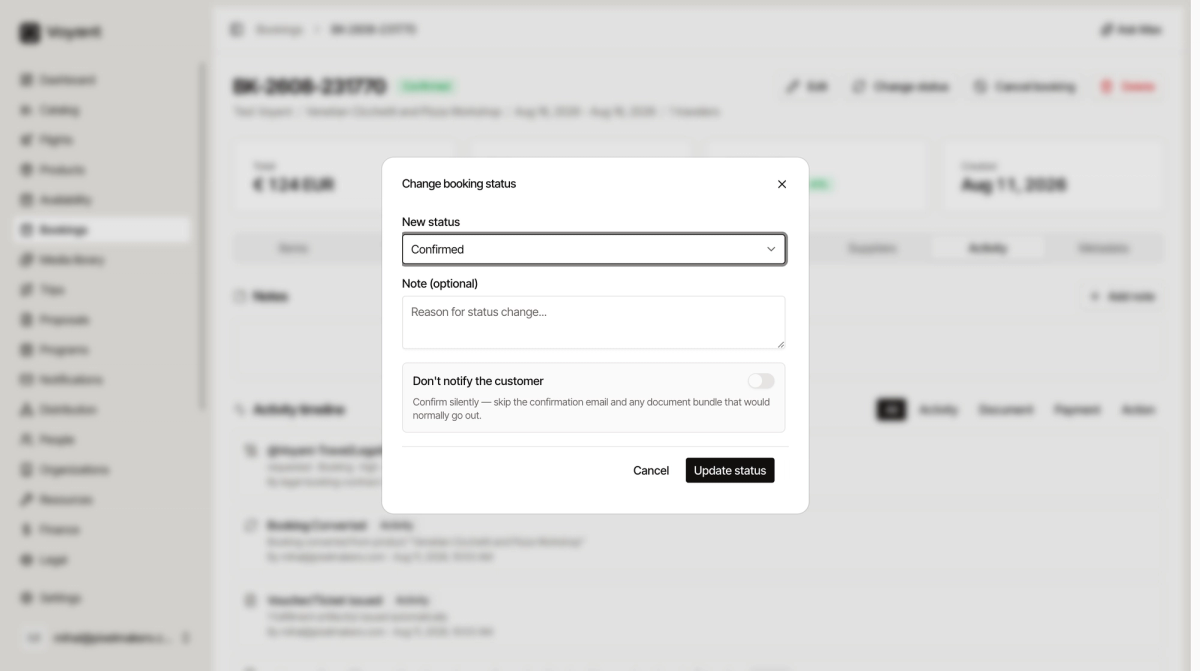
The quiet switch
Don't notify the customer skips the confirmation email and any documents that would normally go out.
Turn it on when you are fixing your own records and the customer does not need to know, for example correcting a status you set by mistake.
Leave it off when the change is real news for them.
Cancel booking
There is a separate Cancel booking button in the header. Use that rather than setting the status to Cancelled by hand, because it handles the refund and the release of the place properly.
Did this answer your question?
Thanks for your feedback.