



The booking page: a tour of the eight tabs
Open any booking and you get a header, four summary cards, and eight tabs. Here is what each one is for.
Voyant Support
Click any row in the list to open the booking.
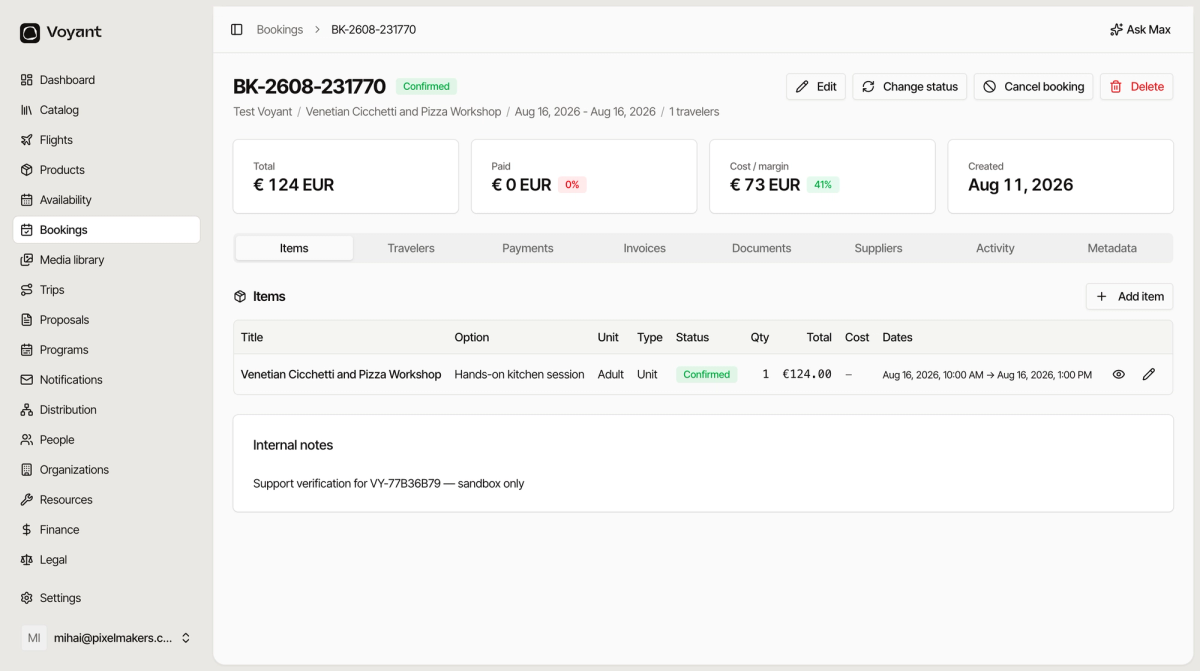
The header
The reference, the status, and a summary line: customer, product, travel dates, number of travelers.
Four buttons sit on the right.
- Edit changes the booking details.
- Change status moves it between Confirmed, In progress, Completed and Cancelled.
- Cancel booking cancels properly, handling the refund and releasing the place.
- Delete removes it entirely. Rarely the right choice.
The four cards
- Total is the value of the booking.
- Paid is what you have actually collected, with a percentage. A red 0 percent means nothing has come in.
- Cost / margin is what it costs you and what you keep.
- Created is when the booking was made.
The eight tabs
- Items is what they bought.
- Travelers is the payer and the people going.
- Payments is the schedule, payments received, payment links and refunds.
- Invoices is the invoices raised against this booking.
- Documents is contracts, vouchers and anything uploaded.
- Suppliers is what you have confirmed with the people delivering it.
- Activity is notes and the full history.
- Metadata is the technical detail, mostly for support.
Did this answer your question?
Thanks for your feedback.