



Payments: schedules, links and refunds
Everything about money on one booking. What is due when, what has arrived, how to ask for it, and how to give it back.
The busiest tab on the page. It has six parts.
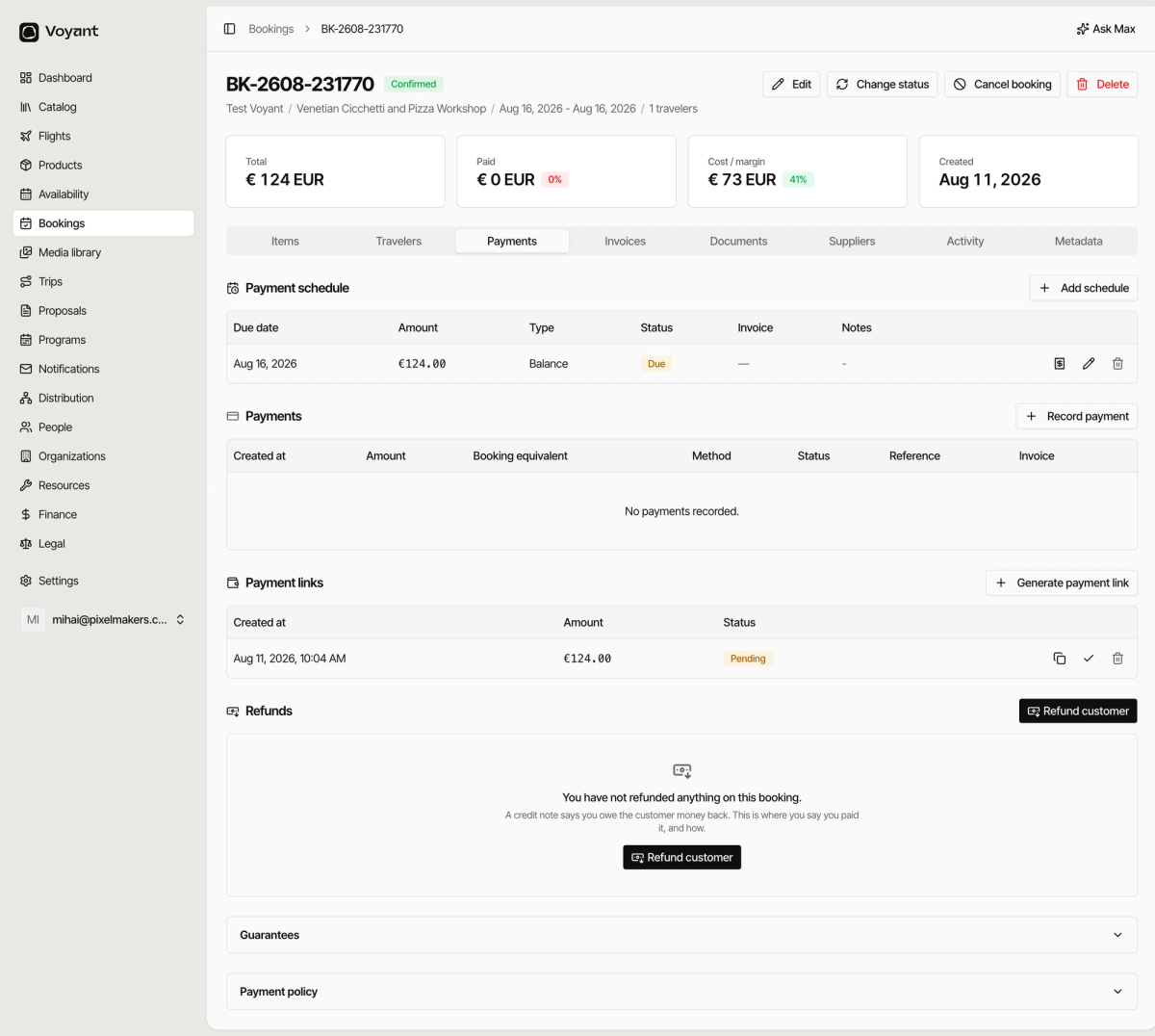
1. Payment schedule
What the customer owes and when. A plan, not money received.
Full detail in Payment schedules.
2. Payments
Money that has actually arrived. Click Record payment for anything paid outside Voyant, such as a bank transfer or cash.
Full detail in Record a payment.
3. Payment links
A link you send so the customer can pay by card themselves. The quickest way to collect a balance.
Full detail in Payment links.
4. Refunds
Money going back, by any method. Not just card reversals.
Full detail in Refunds.
5 and 6. Guarantees and Payment policy
Two collapsed panels at the bottom. Security held rather than collected, and where this booking got its deposit rules.
Full detail in Guarantees and the payment policy panel.
The order things happen in
- A schedule says what is owed and when.
- A payment link or an invoice asks the customer for it.
- A payment records the money arriving.
- A refund records any of it going back.
Did this answer your question?
Thanks for your feedback.