



Guarantees and the payment policy panel
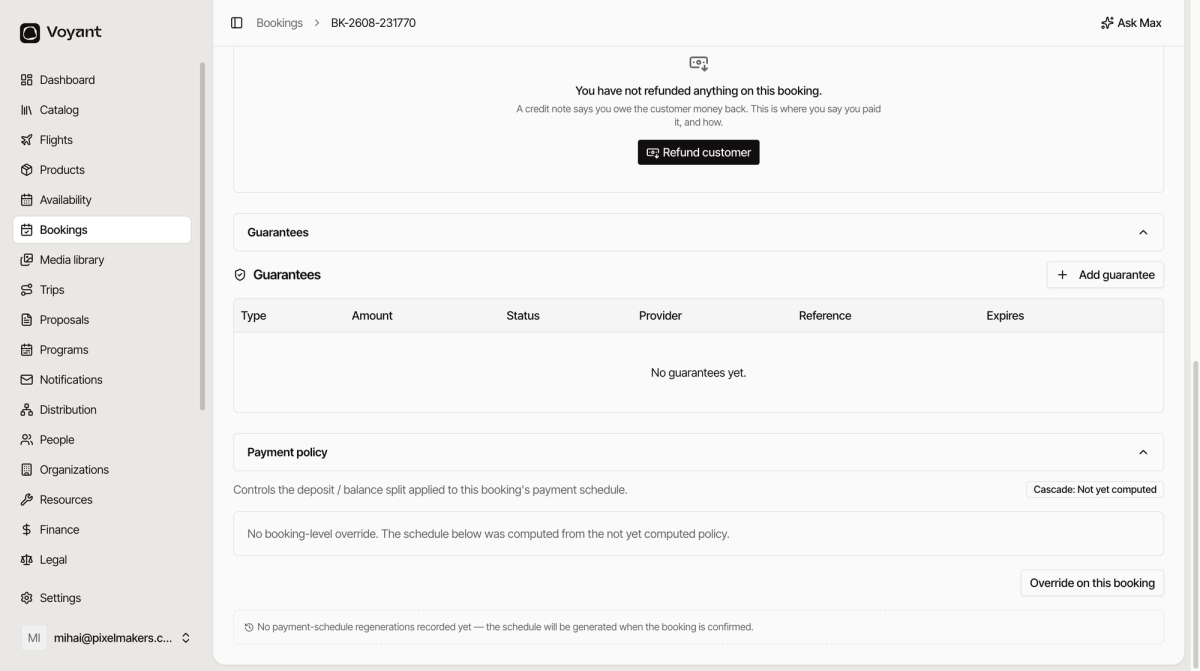
The two collapsed panels at the bottom of the Payments tab: money held as security, and where this booking got its deposit rules.
Two panels sit collapsed at the bottom of the Payments tab. Most bookings never need them.
Guarantees
Money or an undertaking held as security rather than collected as payment. Each row records the type, amount, status, provider, reference and expiry.
Most leisure bookings have none, which is why the panel is usually empty. Full detail in Guarantees.
Payment policy
This shows where the payment schedule came from.
- Cascade shows which policy applied, following the chain from product to category to your organisation default.
- Override on this booking lets you set different terms for this one booking.
If it says no booking-level override, the schedule was computed from your normal rules, which is what you want most of the time.
When the schedule appears
On an unconfirmed booking the panel may say the schedule will be generated when the booking is confirmed. That is normal. Confirm the booking and the rows appear.
Did this answer your question?
Thanks for your feedback.