



Text messages
Send SMS from the workspace, rent your own number, and see every message in a log.
Some messages need to arrive now: a pickup time changed, a departure is cancelled, a balance is due today. Text beats email for those.
Click Settings, then SMS.
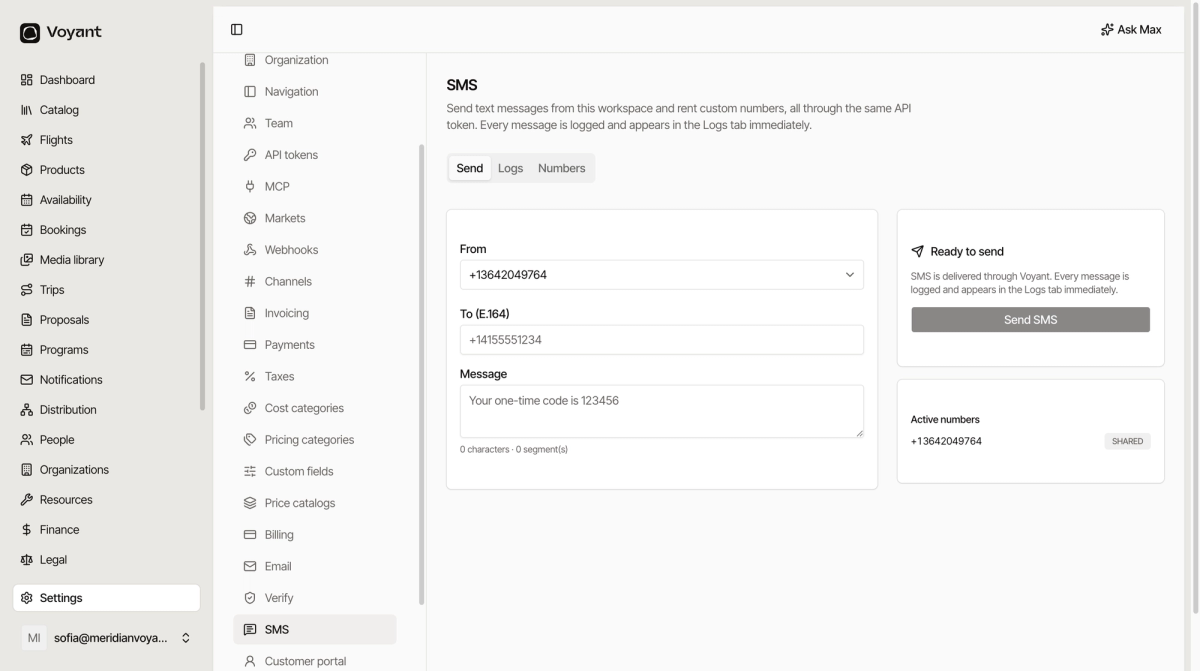
The three tabs
- Send, send a message by hand.
- Logs, every message and its delivery state.
- Numbers, the numbers you can send from.
Send one
Pick a From number, enter the recipient To in E.164 format, type the message, click Send SMS.
E.164 means the full international form with a plus and country code: +40721234567, not 0721 234 567. A local-format number will not deliver.
Characters and segments
The counter under the box shows both. A plain-text message fits 160 characters in one segment. Go over and it splits into several, each billed separately.
Accented characters and emoji cut the limit to 70. A single "ș" in a Romanian message can triple its cost, so watch the segment count rather than the character count.
Numbers
A SHARED number is provided by Voyant and used by several workspaces. It works, and replies do not come back to you.
Renting your own number means a consistent sender your customers can recognise, and the ability to receive replies. Worth it once you send regularly.
Logs
Every message appears in Logs immediately, sent or failed. When somebody says they got nothing, look here first.
Using SMS in reminders
You do not have to send by hand. Reminder steps can send SMS automatically. See Reminder steps.
Did this answer your question?
Thanks for your feedback.