



One-time codes
The six-digit codes that confirm somebody owns the phone or email they gave you.
When a customer signs in to your portal, or you need to be sure a phone number is real, Voyant sends a one-time code and checks it came back.
Click Settings, then Verify.
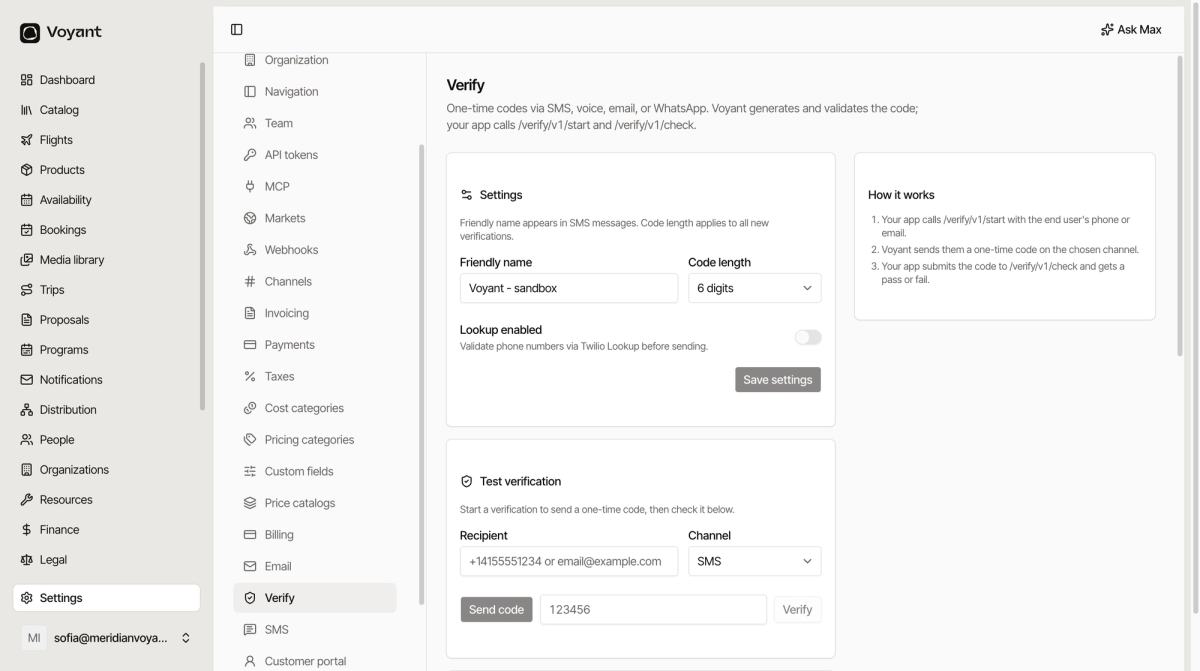
Settings
- Friendly name is what appears in the SMS, so the customer knows who is asking. Use your trading name.
- Code length applies to all new verifications. Six digits is the default and what people expect.
- Lookup enabled checks a phone number is real and reachable before spending money sending to it.
Click Save settings.
Four channels
Codes go by SMS, voice, email or WhatsApp. Voice is the one people forget: it works on a landline, which matters for older travellers.
Test it
Use Test verification to send yourself a code and check it. Enter a recipient, pick a channel, click Send code, then enter what arrives and click Verify.
Do this after changing the friendly name, so you can see what customers see.
Recent attempts
Every start and check is logged with the channel, the outcome and the times. APPROVED means the code came back correctly.
A run of unapproved attempts against one number usually means the messages are not arriving, not that somebody is typing badly.
Where codes are used
Mainly the customer portal, where they replace passwords. Nobody forgets a code they were just sent.
Did this answer your question?
Thanks for your feedback.