



Payment links: getting paid without chasing
Generate a link, send it to the customer, and they pay by card themselves. No card details over the phone.
A payment link is a page you send the customer where they can pay by card.
It is the easiest way to collect a balance. You do not take card details over the phone, and you do not have to record the payment afterwards because it records itself.
Steps
- Open the booking and go to Payments.
- Click Generate payment link.
- Choose what to Charge.
- Click Generate link.
- Copy the link from the row that appears and send it to the customer.
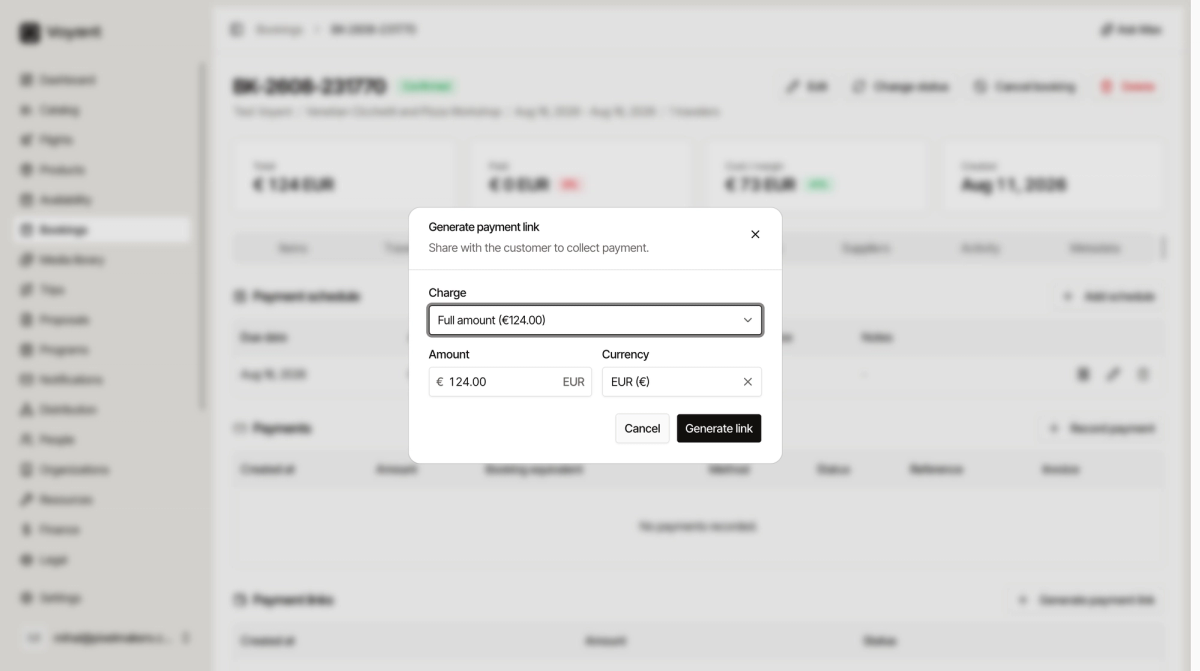
What to charge
The Charge dropdown offers two kinds of choice.
- Full amount is everything outstanding on the booking.
- A schedule row, shown with its type, amount and due date, such as "Balance, 124.00 EUR, 2026-08-16".
Pick the schedule row when you are chasing one specific instalment. That way the payment attaches to the right row when it arrives.
You can also type a different Amount for a part payment.
Tracking the link
Each link appears in the Payment links table with when it was created, the amount, and its status.
- Pending means it has been created but nobody has paid yet.
- Once paid, the payment appears in the Payments table on its own.
The icons on the row let you copy the link again, mark it as settled, or delete it.
Did this answer your question?
Thanks for your feedback.