



Get a product ready to sell
Voyant tells you what is missing before a product can go on sale. Here is how to read the warnings and clear them.
Voyant Support
A new product is rarely ready on the day you create it. Voyant checks it for you and says what is missing.
Where to look
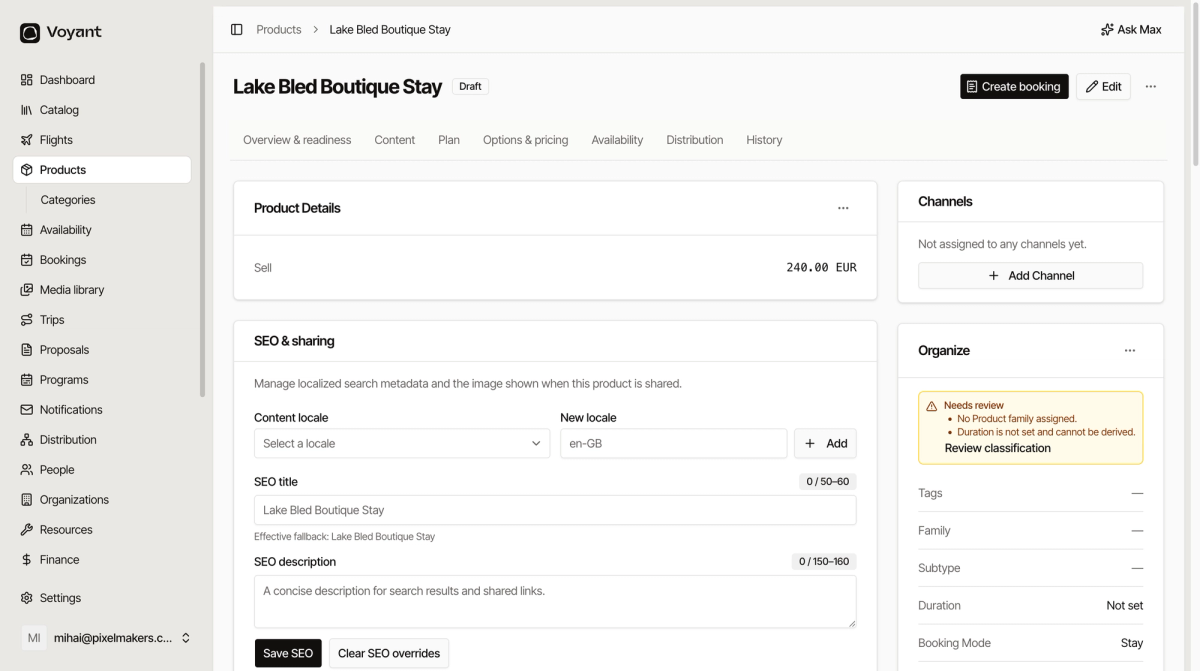
Open the product. On the right, under Organize, an orange Needs review box lists the problems.
Common warnings
No Product family assigned
Open Edit and choose a Product family. See Families, subtypes, categories and tags.
Duration is not set and cannot be derived
Either type a Duration (minutes) in Edit, or add itinerary days so Voyant can work it out for you.
No departures
The product has no dates to sell. Add one, or set up a repeating schedule. See Departures and recurring schedules.
No prices
Add at least one traveler type with a price. See Booking options and who pays what.
The checklist before you go live
- The Needs review box is gone.
- There is at least one photo.
- Prices are set for every traveler type you sell.
- There are dates on sale for the period you want.
- The product is on a channel, so it can appear on your website.
- Status is switched from Draft to Active.
Did this answer your question?
Thanks for your feedback.