



Activity and Metadata
The full history of a booking, filtered by kind, plus the technical identifiers support will ask for.
Voyant Support
Notes
Free text at the top of the Activity tab. Click Add note for anything the next person should know, such as "Customer asked to be seated near the front".
Activity timeline
Everything that has happened to this booking, newest first.
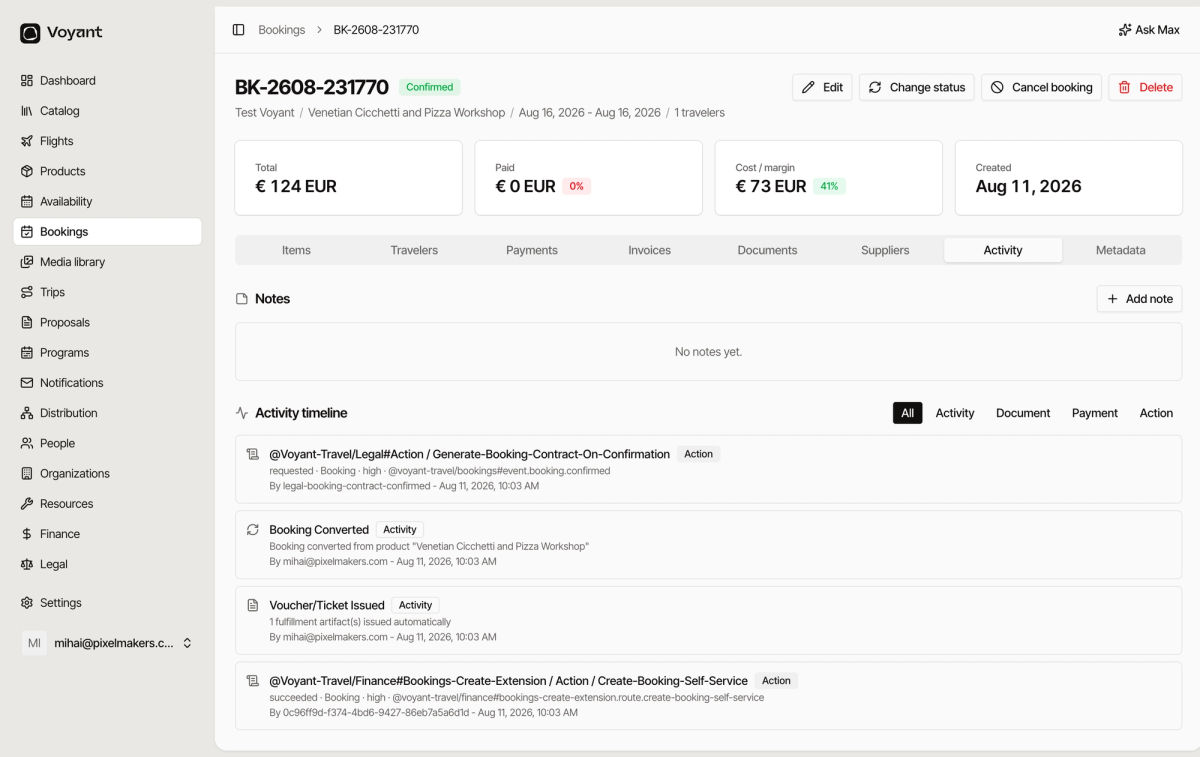
Use the filters above the timeline to narrow it.
- All shows everything.
- Activity shows changes people made.
- Document shows documents created or sent.
- Payment shows money movements.
- Action shows automatic things the system did, such as generating a contract on confirmation.
Each entry says what happened, who did it, and when. Entries by a person show their email. Entries by the system show which automation ran.
Metadata
The technical detail: booking ID, booking number, status, communication language, created and updated timestamps.
You will rarely need this. When you contact support about a booking, the Booking ID is the thing to quote.
Did this answer your question?
Thanks for your feedback.