



The pipeline board
Proposals are shown as cards in columns, one column per stage. The board tells you what is in play and what it is worth.
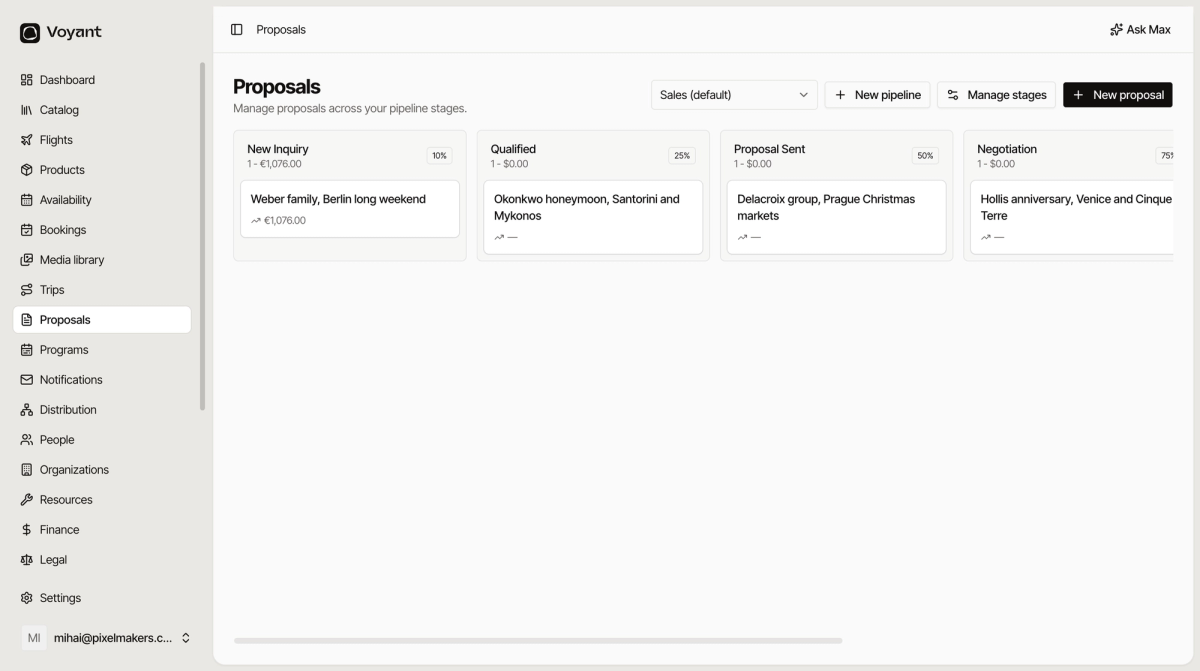
The Proposals screen is a board. Each column is a stage, each card is a deal.
Reading a column
The heading gives you three things.
- The stage name, such as Proposal Sent.
- The count and value, such as "1 - €1,076.00".
- The probability, such as 50 percent, meaning how likely a deal at this stage is to close.
Probability is what turns a list into a forecast. Ten thousand euros sitting in Negotiation at 75 percent is worth more to your month than the same amount in New Inquiry at 10 percent.
Reading a card
Each card shows the proposal title and its value. A dash means no line items have been added yet, so there is nothing to total.
Click a card to open the proposal.
Moving a deal
Drag a card to another column to move the deal along. See Move a deal through the stages.
Pipelines
The dropdown at the top selects which pipeline you are looking at, with Sales (default) to start.
Click New pipeline if you need a separate process, for example one for leisure enquiries and one for school groups.
Did this answer your question?
Thanks for your feedback.