



The payments ledger
Every customer and supplier payment in one list, with the method and reference for each.
Voyant Support
The Payments screen is every payment across the business, described as all customer and supplier payments in one place.
The Payments tab on a booking shows one booking. This shows all of them.
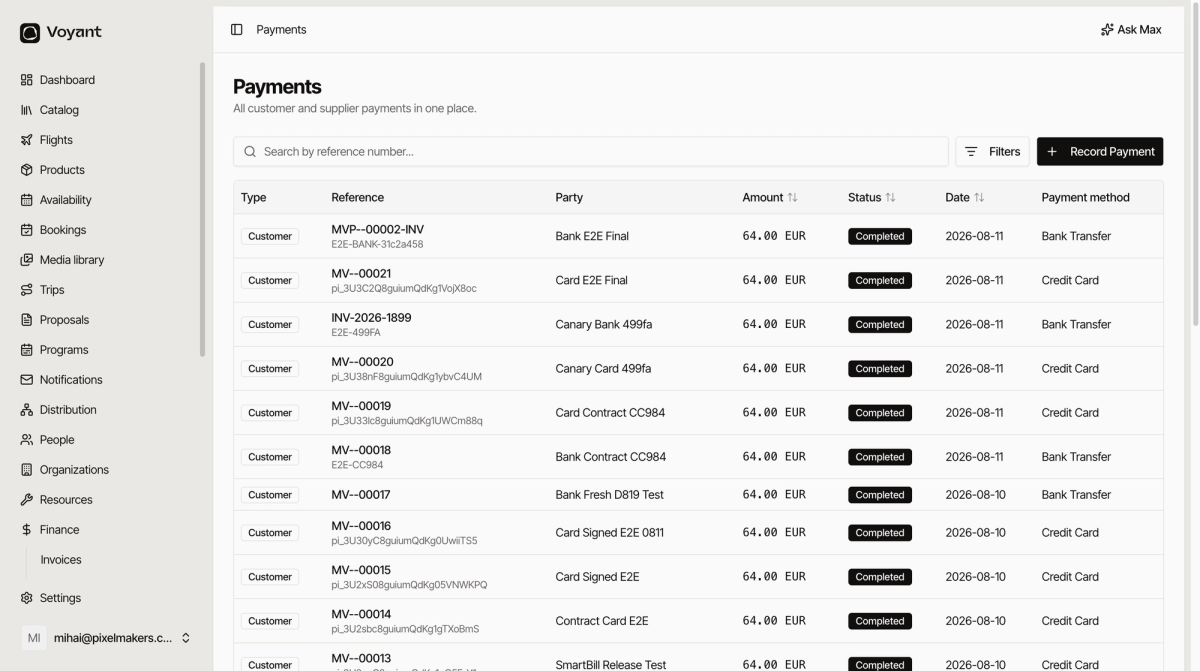
The columns
- Type is Customer or Supplier, so you can tell money in from money out.
- Reference is the invoice number or the processor reference.
- Party is who paid or was paid.
- Amount and Status.
- Date is when it settled.
- Payment method is Bank Transfer, Credit Card, Cash and so on.
What it is for
Reconciliation. When your bank statement shows forty transfers, this is the list you match them against, which is why the Reference matters so much.
Search by reference number to find one payment quickly.
Recording a payment
Click Record Payment to enter one here, or record it on the booking, which is usually easier because the invoice and amount are already in front of you. See Record a payment.
Did this answer your question?
Thanks for your feedback.