



Reminder rules: chasing people automatically
A rule watches for something, such as a balance falling due, and sends the right template at the right time without anyone remembering to.
Voyant Support
Chasing balances by hand is the job everybody forgets. A reminder rule does it for you.
Click Notifications, then Reminder Rules, then New Rule.
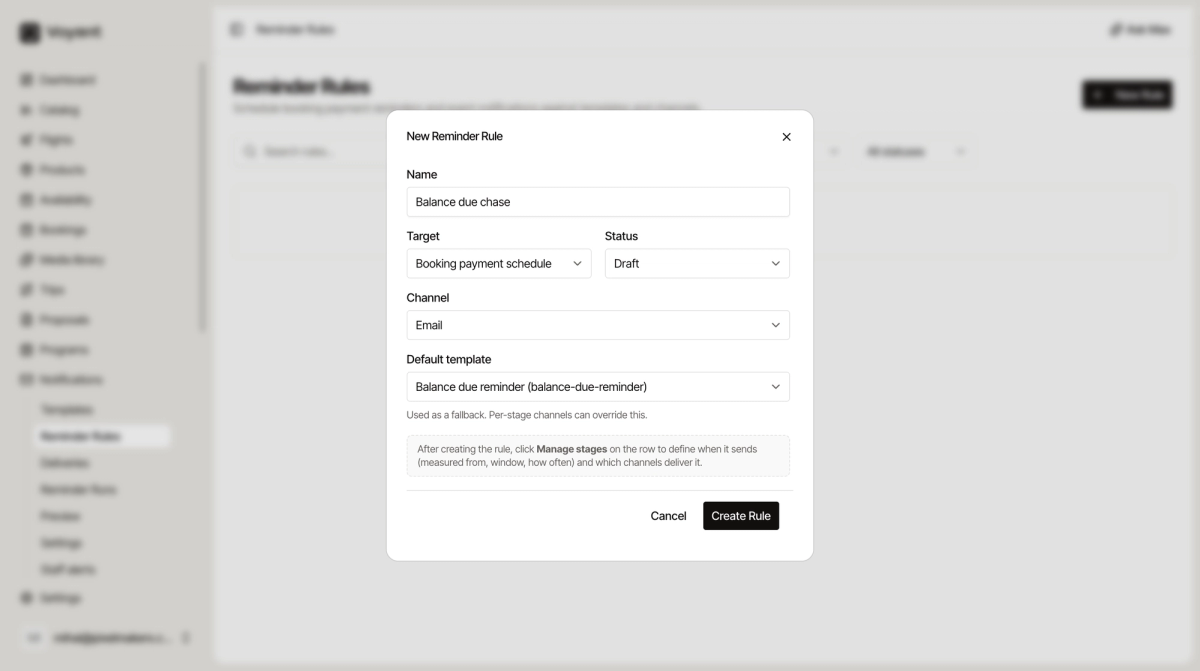
The fields
- Name, something you will recognise, such as "Balance due chase".
- Target, what the rule watches.
- Status, Draft while you build it.
- Channel, email or SMS.
- Default template, which message to send. Per-stage channels can override it.
The four targets
- Booking payment schedule, for chasing money that is due.
- Booking confirmed, for messages that follow a confirmation.
- Payment complete, for thanking or confirming once paid.
- Booking cancelled (non-payment), for when a booking falls over because nobody paid.
The target decides what the rule is watching. The timing comes from the steps you add next.
Then add the timing
Creating the rule does not make it send anything. As the panel says, click Manage stages on the row to define when it sends and which channels deliver it.
See Reminder steps.
Did this answer your question?
Thanks for your feedback.