



Price catalogs
A price book per currency and per audience. Public prices in EUR, net prices for partners, all from the same products.
The same tour has more than one price. €185 on your website, £160 in Britain, and a lower net rate for the agency that resells it.
A price catalog is one of those price lists. Click Settings, then Price catalogs.
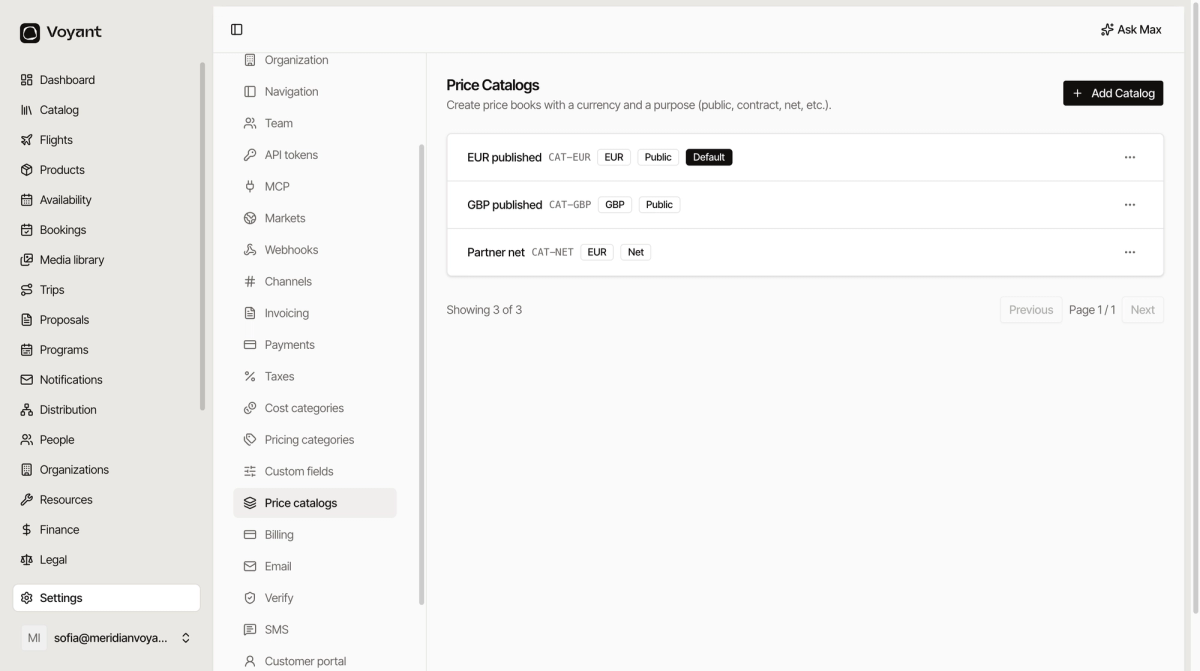
What a catalog carries
- A code such as
CAT-EUR. - A currency.
- A purpose: Public, Net, Contract and so on.
- A status: published or not.
- Optionally, Default.
The two questions a catalog answers
Which currency and which audience. CAT-EUR is public prices in euros. CAT-NET is partner net prices, also in euros. Same currency, different audience, so two catalogs.
Public and net
A Public catalog is what a customer sees. A Net catalog is what you charge a reseller before they add their own margin.
Keeping them apart is what stops a partner rate appearing on your website.
Add one
Click Add Catalog, give it a code, pick a currency and a purpose, then publish it when the prices are in.
The default
One catalog is marked Default. It is used when nothing more specific applies, so make it the one most of your business runs on.
Catalogs and markets
The market decides which currency a customer is quoted in. The catalog holds the numbers. A market without a matching catalog has nothing to quote.
Did this answer your question?
Thanks for your feedback.