



Pricing categories
Adult, child, single room, per vehicle. The dimensions your prices are broken down by, defined once and reused.
Prices are rarely one number. There is an adult price, a child price, a single-room supplement.
A pricing category is one of those lines, defined once so every product can reuse it.
Click Settings, then Pricing categories.
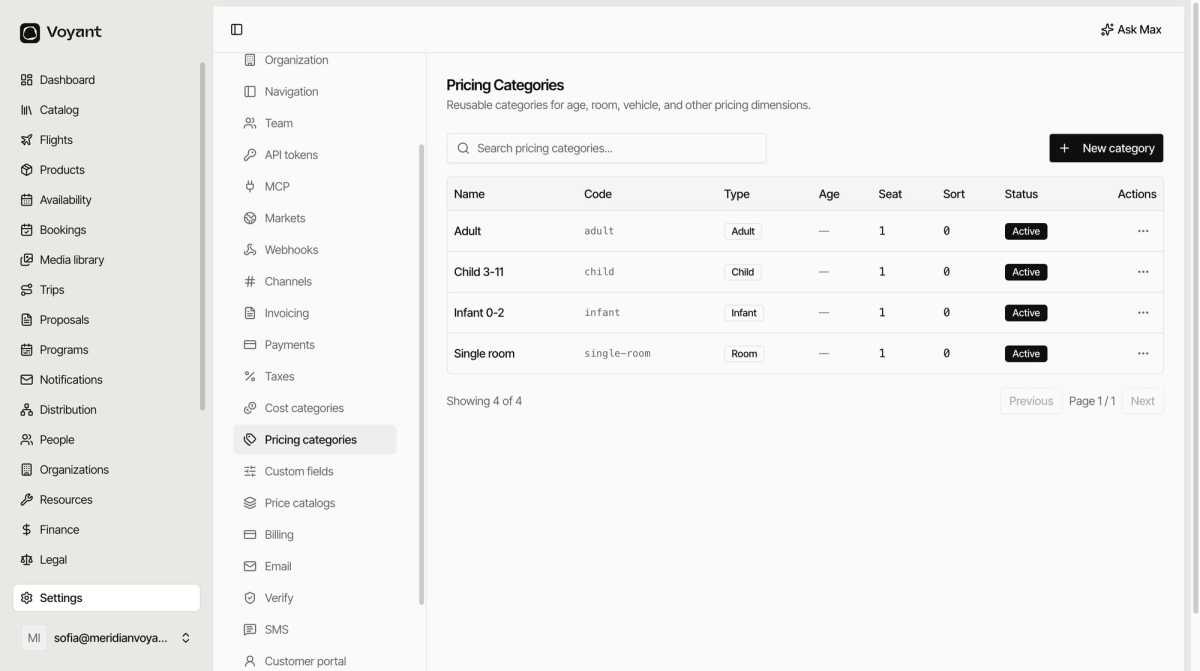
Add one
- Click New category.
- Give it a Name customers would recognise, such as "Child 3-11".
- Give it a Code such as
child. - Pick a Type.
- Set a Sort order so it appears where you expect.
- Leave Active on and click Create category.
The nine types
Adult, Child, Infant, Senior, Group, Room, Vehicle, Service and Other.
The type is not decoration. It tells Voyant whether the line counts as a person, a room or a vehicle, which affects capacity as well as price.
Put the age range in the name
"Child" alone causes arguments at the coach door. "Child 3-11" does not. The name is what appears at checkout, so make it unambiguous.
Sort order
Adult first, then child, then infant, then supplements. Give yourself gaps: 10, 20, 30 rather than 1, 2, 3, so you can insert one later without renumbering.
Categories are the shape, catalogs are the numbers
A pricing category says "there is a child price". A price catalog says what it is, per currency.
Did this answer your question?
Thanks for your feedback.