



Find a booking
Search by reference or name, or narrow the list with filters when you only have partial information.
Voyant Support
A customer rings up. You need their booking in front of you before they finish their sentence.
Search
The search box takes a booking reference or a name. If they read out "BK-2608-231770", paste it in and you are there.
Filters
When they cannot find the reference, click Filters and narrow it down.
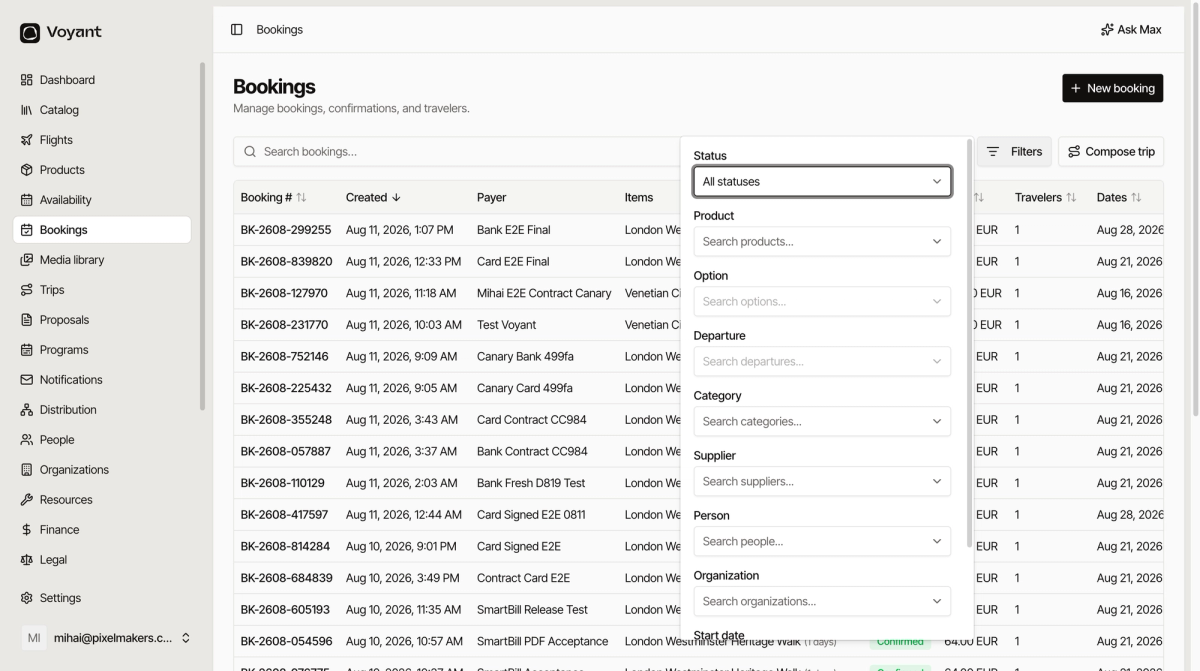
- Status limits to Confirmed, In progress, Completed or Cancelled.
- Product and Option limit to what they bought.
- Departure limits to one specific date.
- Category and Supplier are useful when a supplier asks about their bookings.
- Person and Organization find everything for one customer or one company.
- Start date limits by when they travel.
- Travelers limits by party size.
A worked example
"I booked something in Venice for my wife and me, some time in August."
- Set Product to the Venetian workshop.
- Set Travelers to 2.
- Set Start date to August.
That is usually one or two rows.
Did this answer your question?
Thanks for your feedback.