



Items: what the customer bought
Every line on the booking, with the option, the traveler type, the quantity, the price and the exact dates.
Voyant Support
Items is the shopping list. One row per thing bought.
The columns
- Title is the product.
- Option is the version they chose, such as "Hands-on kitchen session".
- Unit is the traveler type, such as Adult or Child.
- Type distinguishes a normal unit from an extra.
- Status is where that line has got to.
- Qty is how many.
- Total is what they pay for that line.
- Cost is what it costs you.
- Dates is the exact start and end, including times.
Add an item
Click Add item to sell them something else on the same booking, such as an extra night or an add-on they decided on later.
This keeps everything under one reference and one invoice, rather than creating a second booking.
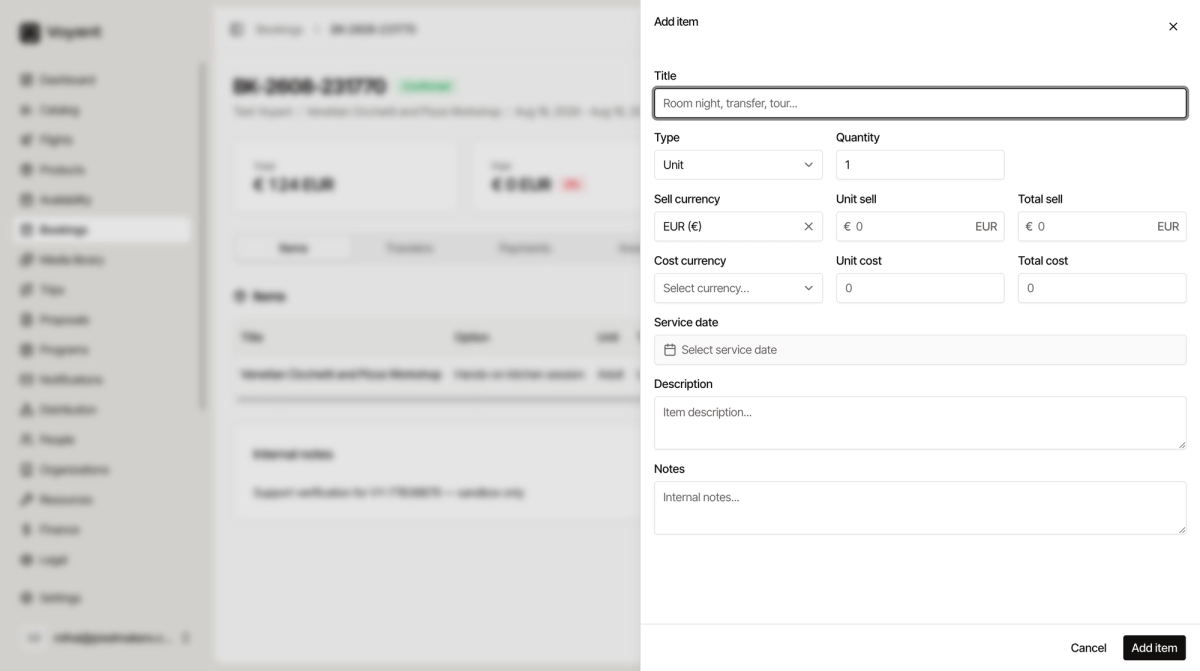
Fill in Title, Quantity and Unit sell at minimum. Set Unit cost too, so the margin stays honest. Service date is the day the thing actually happens.
Internal notes
Below the table. Anything your team needs to know about this booking. Customers never see it.
Did this answer your question?
Thanks for your feedback.