



Add extras to a product
Extras are the optional add-ons a customer can tick at checkout, such as hotel pick-up, lunch or equipment hire.
Voyant Support
An extra is something optional the customer can add to their booking. It is not part of the base price.
Good candidates
- Hotel pick-up and drop-off
- Lunch or a tasting menu
- Equipment hire, such as a bike or wetsuit
- A printed photo book
- Travel insurance
Add one
- Open the product and scroll to Booking options and prices.
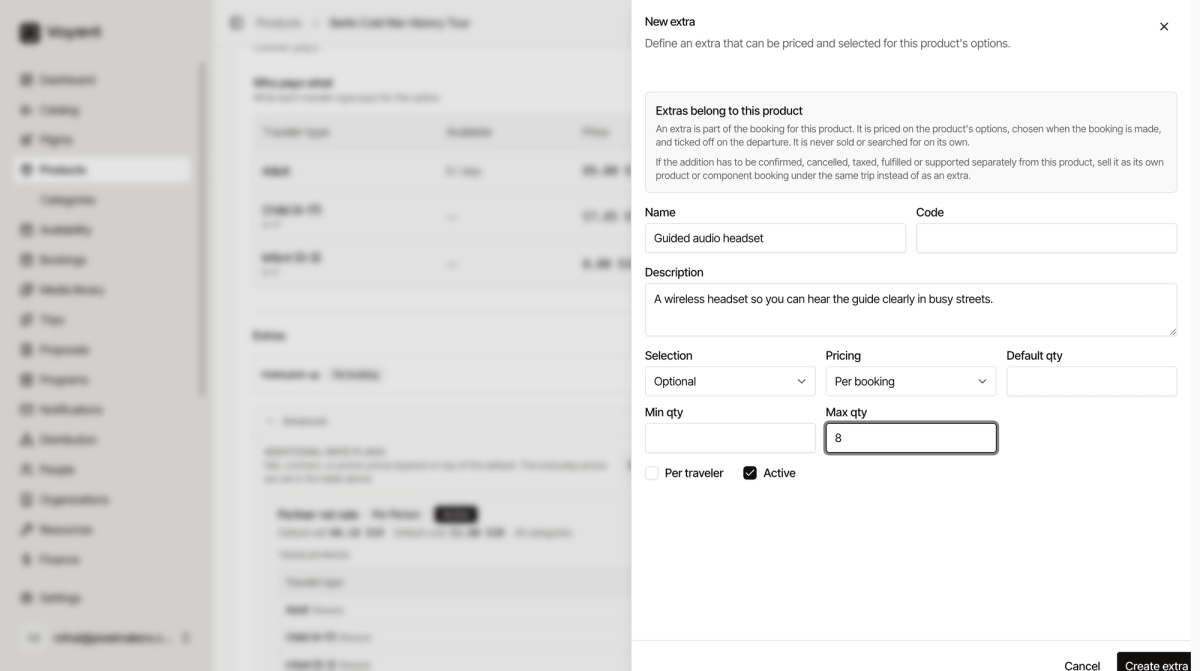
- Find the Extras area and click Add extra.
- Type a Name as the customer would see it, for example "Hotel pick-up".
- Set Selection to Optional, or Required if every booking must have it.
- Set Pricing to Per booking or per traveler, whichever matches.
- Set Min qty and Max qty if there are limits, such as one bike per person.
- Leave Active ticked and click Create extra.
Per booking or per traveler?
This is the field people get wrong.
- Per booking charges once, no matter how many people. A private taxi to the meeting point is per booking.
- Per traveler multiplies by headcount. A lunch or a bike is per traveler.
Extra or traveler type?
This trips people up. The rule is simple.
- If everyone booking pays it, it belongs in the base price or as a traveler type.
- If the customer can say no to it, it is an extra.
Lunch that is always included belongs in "What is included". Lunch you can decline is an extra.
Did this answer your question?
Thanks for your feedback.