



What your assistant can do once connected
Around 280 tools, each labelled by risk, and a confirmation gate on anything that would be expensive to undo.
A connected assistant does not get vague access to your account. It gets a specific list of tools, each one a single named action.
Scroll to Available tools on the MCP page to see the whole list, with a search box.
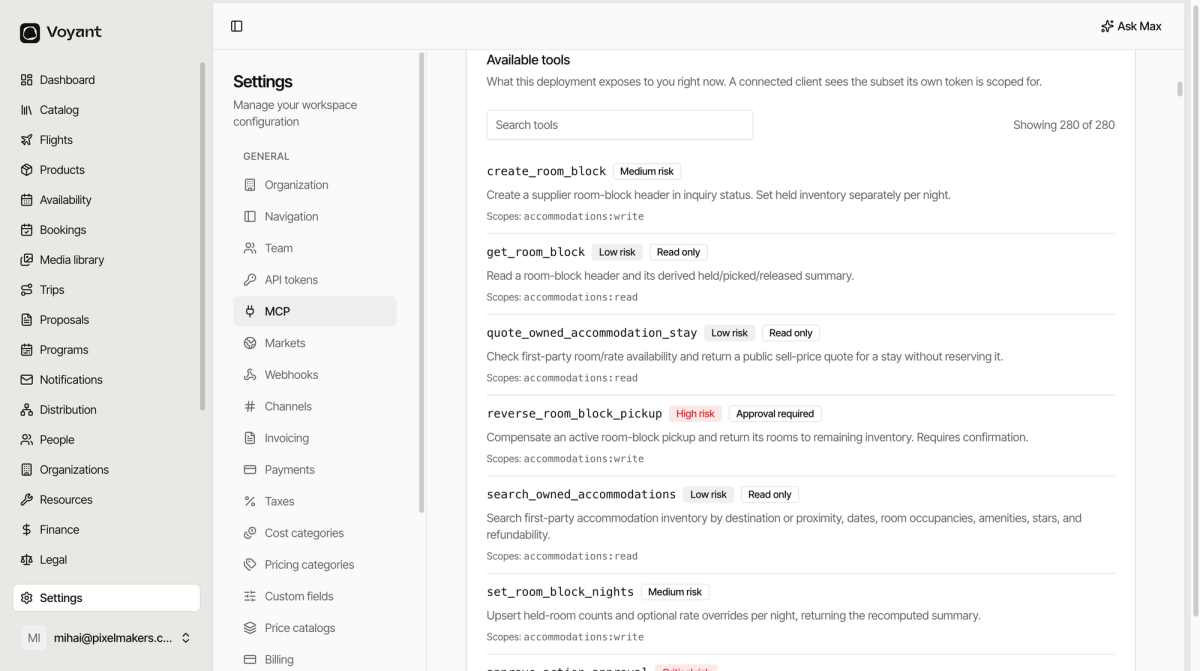
Reading the list
Each tool shows a name, a risk level, a plain description and the scopes it needs.
- Low risk with Read only, it looks things up and changes nothing.
search_owned_accommodationsis one. - Medium risk, it creates or changes something.
create_room_blockis one. - High risk, it does something hard to undo. Often marked Approval required.
- Critical risk, it affects approvals and audit records themselves.
The read-only tools are the ones worth starting with. They cannot damage anything.
What to ask
Questions that would otherwise mean opening four screens:
- "Which September departures still have space?"
- "Show me every booking with an unpaid balance due this month."
- "What did we spend on coaches in July?"
- "Which customers have travelled with us more than twice?"
Approvals
Anything destructive stops and asks. The tool description says so directly: "Requires confirmation."
You get the confirmation in the chat, and nothing happens until you agree.
It sees less than you do
A connected client sees only the subset its own permissions allow, so an assistant connected with limited access simply does not have the other tools.
Max is the same idea, built in
Max is Voyant's own assistant, with permissions you set under Settings → Max. Connecting ChatGPT or Claude is for when you would rather work in the assistant you already use.
Did this answer your question?
Thanks for your feedback.