



Connect a coding tool
Claude Code, Cursor and VS Code connect with an API token instead of a sign-in. Ready-made snippets are on the MCP page.
ChatGPT and Claude sign in through your browser. Developer tools cannot do that, so they authenticate with an API token instead.
This one is for whoever looks after your systems. If that is not you, send them this page.
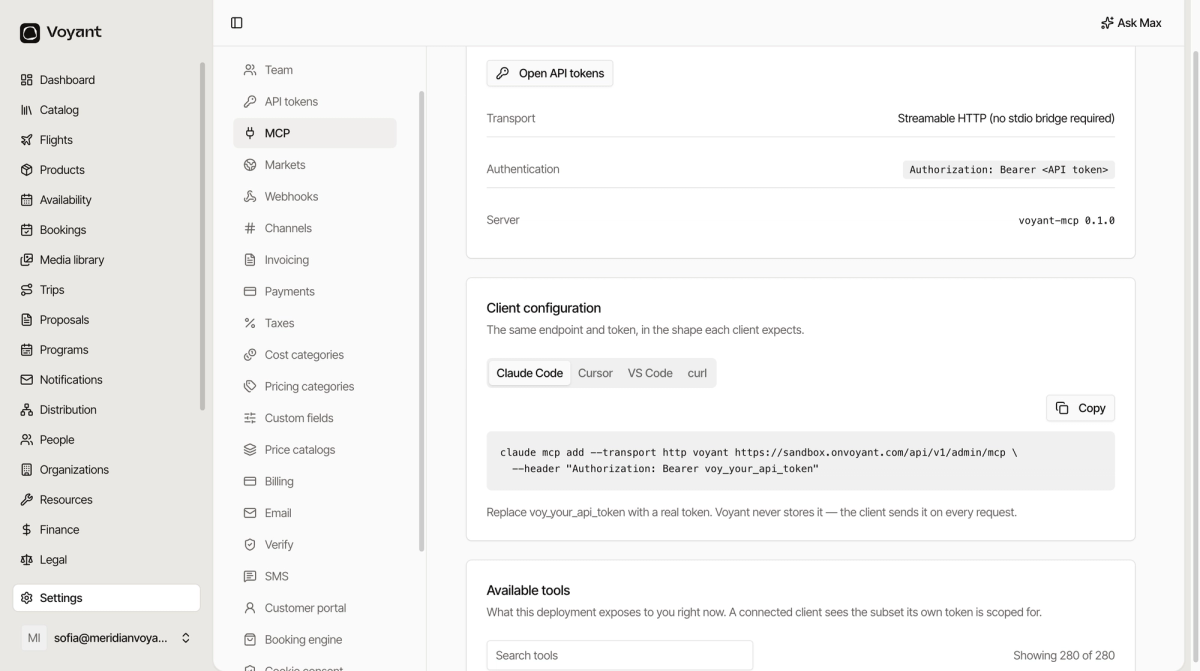
The connection details
- Transport: Streamable HTTP. No stdio bridge required.
- Authentication: an
Authorization: Bearerheader carrying an API token. - Server:
voyant-mcp.
Voyant never stores the token. The client sends it on every request.
Client configuration
The Client configuration card has a tab per tool: Claude Code, Cursor, VS Code and curl. Each shows exactly what that client expects, with a Copy button.
Claude Code takes a single command. Cursor and VS Code take a small JSON block in a config file, and the card tells you which file. curl is there to check the connection is alive.
Copy the snippet, replace the placeholder token with a real one, and you are connected.
You need a token first
Tokens are created under Settings → API tokens, and scoped to only what the integration should reach. The assistant then sees only the tools those permissions cover.
More detail
The technical reference lives at voyant.travel/docs.
Did this answer your question?
Thanks for your feedback.