



What Max is allowed to do
Max is your AI assistant. You choose which parts of the business it may touch, and the risky ones stay off until you say otherwise.
Max can read your catalog, answer questions and make changes on your behalf. What it may touch is up to you.
Click Settings, then Max.
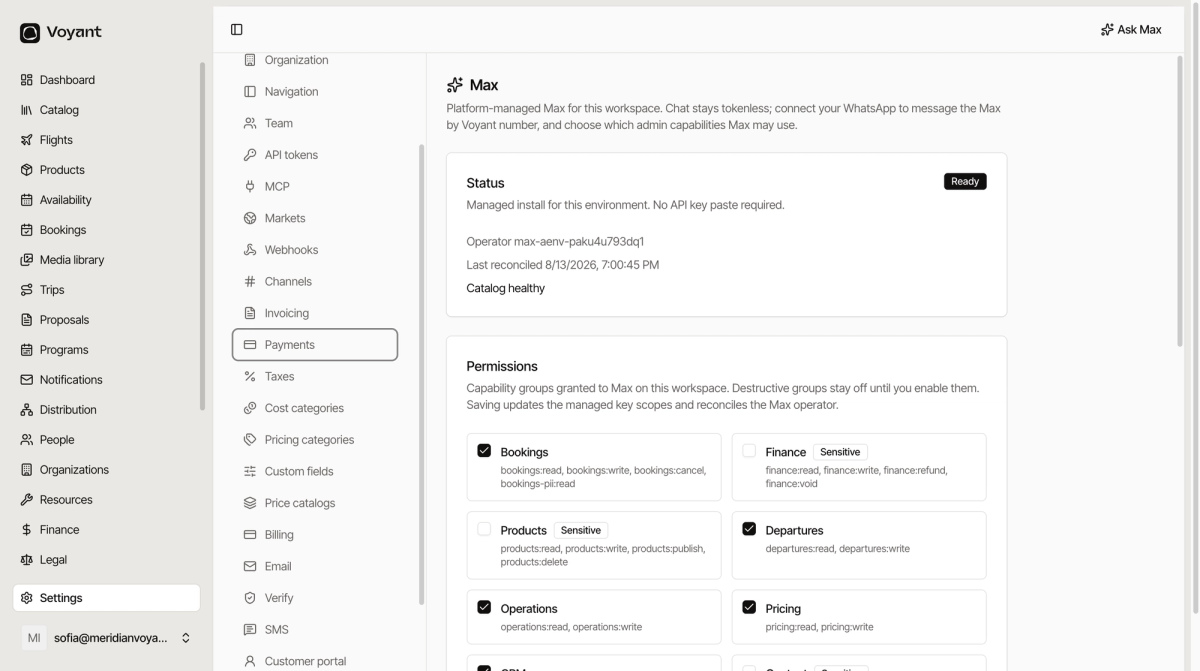
Status
Max is managed for you. There is no API key to paste. The panel shows whether it is Ready, when it last reconciled, and whether the catalog is healthy.
Permissions
Access is granted in groups rather than one tool at a time: Bookings, Finance, Products, Departures, Operations, Pricing, CRM, Content, Media, Notifications, Settings, Suppliers, Promotions, Trips, Proposals and Dashboard.
Groups marked Sensitive are off by default. Finance, Products, Content, Media, Settings and Promotions all carry that mark, because a mistake there is expensive or public.
Tick the groups you want and click Save permissions.
Start small
Turn on the read-heavy groups first, live with it for a week, then add write access where it saves you real time. Bookings and CRM are the usual first choices.
Approvals stay on
Destructive actions still need you to click Approve in the chat, whatever the permissions say. That gate is on by default and is your backstop.
Click Connect my WhatsApp to message Max from your phone using the Max by Voyant number. Useful when you are standing in an airport rather than sitting at a desk.
Org roster lists which staff have enrolled their phones.
Did this answer your question?
Thanks for your feedback.