



What is the media library?
Every photo, video and document you have uploaded, in one place. Upload a picture once and use it on as many products as you like.
Voyant Support
The media library is your filing cabinet. Everything you have ever uploaded lives here.
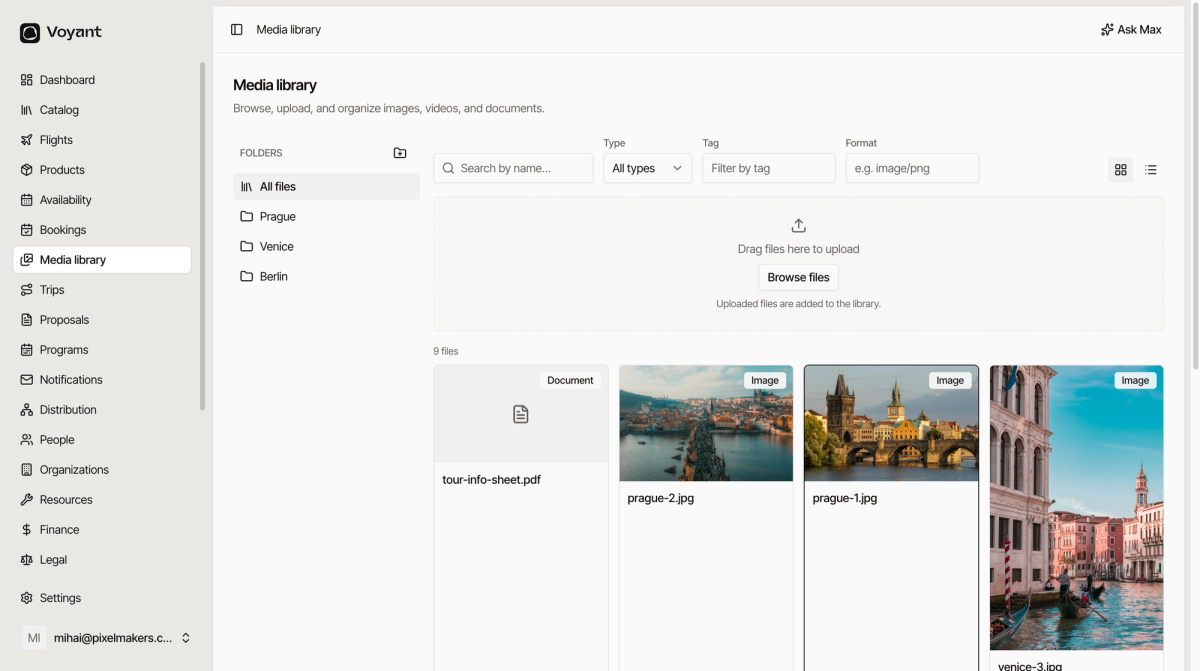
Click Media library in the left menu.
Why it exists
Without it, you would upload the same harbour photo every time you built a product that needed it. With it, you upload once and reuse.
It also means that when a photo is wrong, you fix it in one place.
What it holds
- Images, the bulk of it. Product photos, itinerary day photos, sharing images.
- Videos, for products where motion sells better than a still.
- Documents, such as an information sheet or a signed waiver.
Each file shows a badge saying which it is, so you can tell a PDF from a photo at a glance.
The layout
- Folders down the left, with All files at the top.
- Search by name, plus Type, Tag and Format filters across the top.
- A drag and drop area for uploading.
- The file count, then the files themselves.
The two buttons at the top right switch between grid and list. Grid is better for pictures, list is better when you are checking names and alt text.
Did this answer your question?
Thanks for your feedback.