



The departure page: a tour of the six tabs
Click Open on any date and you land on its own page. Here is what each of the six tabs is for and what you can change in each.
Voyant Support
Every row in the Availability list has an Open button. It takes you to the page for that single date.
This is where you run the departure. Who is coming, where they sit, what was paid, and what still needs doing.
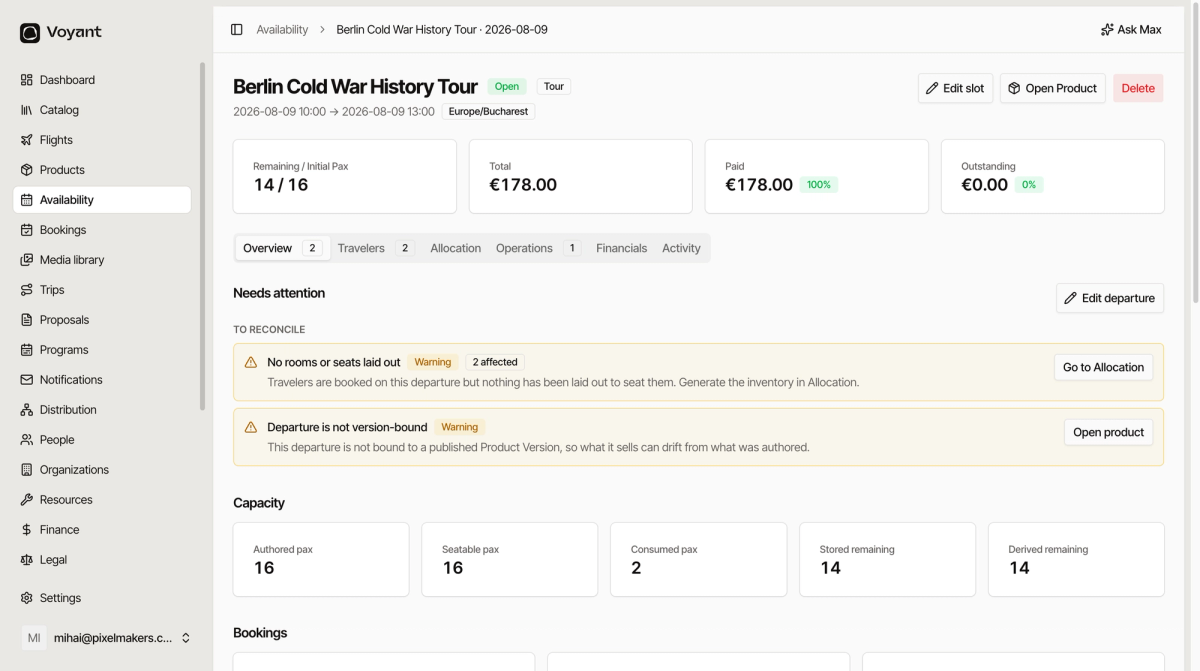
The header
The top of the page tells you what this date is: the product name, its status, the family, the start and end time, and the timezone.
Three buttons sit on the right.
- Edit slot opens the same panel as Edit in the list, for changing times, status and capacity.
- Open Product jumps to the product this date belongs to.
- Delete removes the date. Use it only for a date created by mistake.
The four summary cards
- Remaining / Initial Pax is places left against places you started with, for example 14 / 16.
- Total is the value of everything booked on this date.
- Paid is how much of that has actually been collected, with a percentage.
- Outstanding is what is still owed.
If Paid says 100 percent, nobody owes you anything for this departure.
The six tabs
- Overview is the health check. Problems to fix, capacity numbers, booking counts.
- Travelers is the passenger list, and who still has no name against them.
- Allocation is where you put people in rooms, vehicles and seats.
- Operations holds pickups, closing the date, and the extras manifest.
- Financials is revenue, cost, margin and settlement.
- Activity is notes and a log of what changed.
A number on a tab is a count of things needing attention. Operations 1 means one thing there wants looking at.
Did this answer your question?
Thanks for your feedback.