



Set up an excursion or activity
A worked example: a short activity such as a cooking class or a sunset sail, sold by the seat at a fixed start time.
Voyant Support
An excursion is set up almost exactly like a day tour. The differences are small but worth knowing.
What changes
- Product family is Activity rather than Tour.
- The duration is usually shorter, often 90 to 180 minutes.
- There are often several start times in one day, so Date and time is nearly always right.
- Group sizes tend to be smaller, so set the capacity carefully.
A worked example
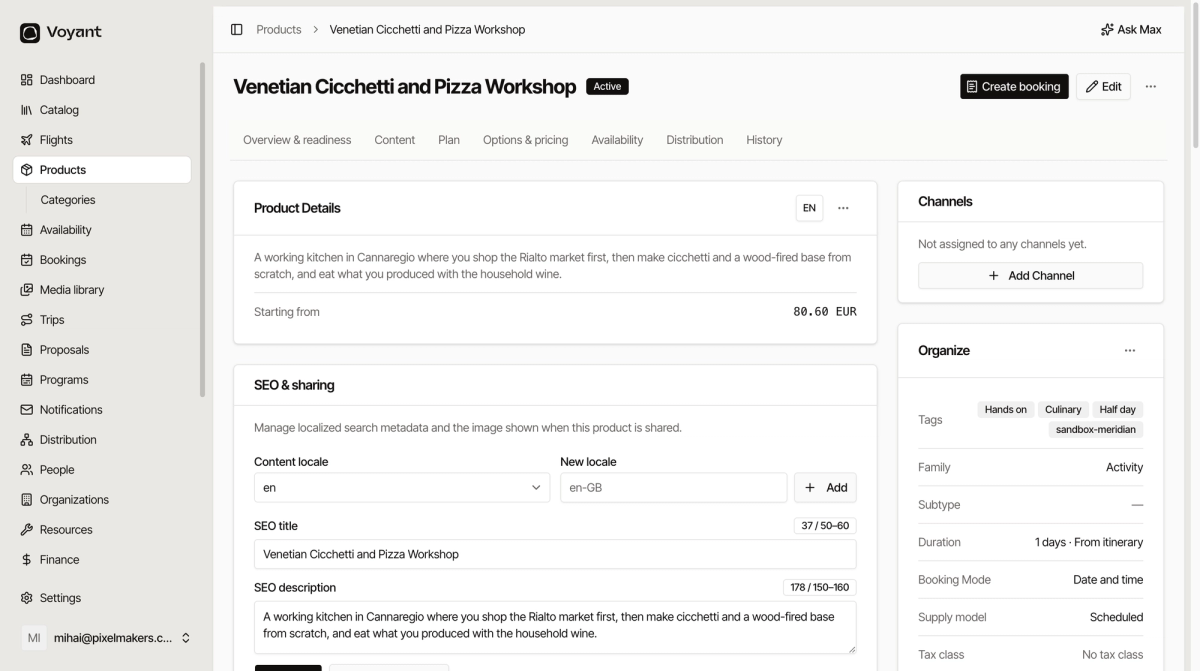
A pizza and cicchetti workshop in Venice, twice a day, twelve places per session.
- New product, name it "Venetian Cicchetti and Pizza Workshop".
- Booking Mode: Date and time.
- Product family: Activity.
- Duration (minutes):
150. - Capacity Mode: Limited.
- Create it, then add an Adult price and a Child price under Who pays what.
- Add a recurring schedule with two start times, for example 11:00 and 17:00, capped at 12 people.
Selling add-ons
Excursions are a good fit for extras, such as a recipe book or hotel pick-up. Add them under Extras on the product page. See Add extras to a product.
Did this answer your question?
Thanks for your feedback.