



Quiet hours, blackout dates and rate limits
Rules that apply across every reminder, so nobody gets a text at three in the morning or five emails in one afternoon.
Automation is only pleasant if it has manners. Notifications then Settings is where you give it some.
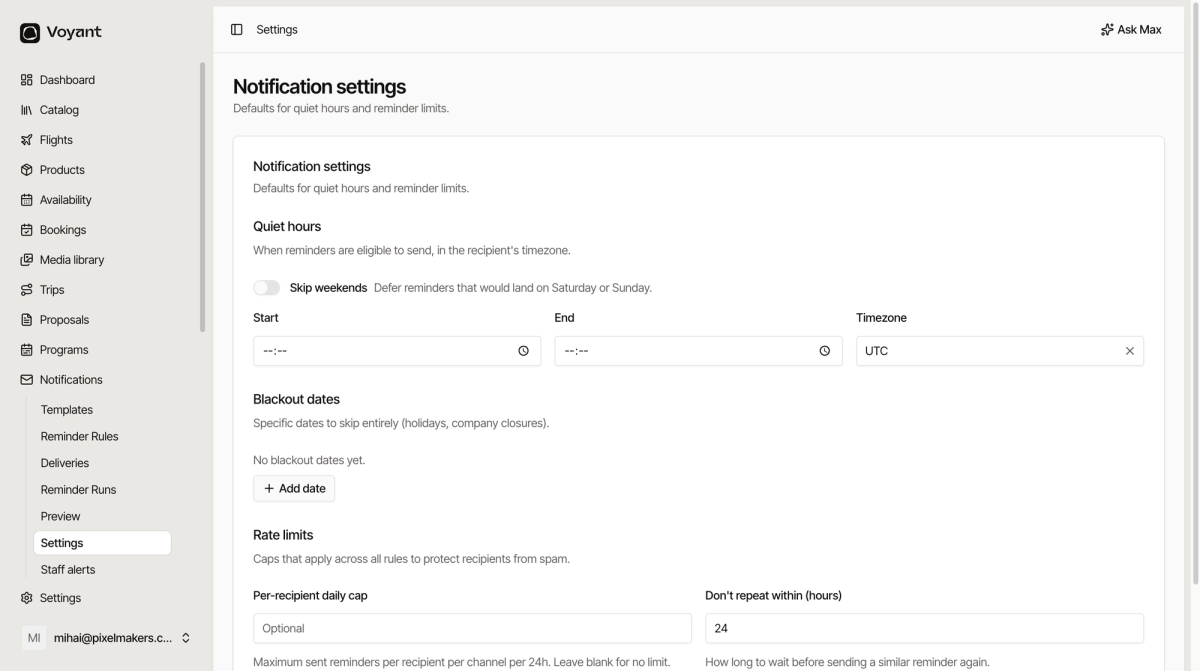
Quiet hours
When reminders are allowed to send, in the recipient's timezone. That last part matters, because a customer in another country should not be woken by your nine in the morning.
Set a Start and End, and the Timezone to fall back on when you do not know the recipient's.
Skip weekends defers anything that would land on a Saturday or Sunday. Sensible for business travel, less so for leisure.
Blackout dates
Specific dates to skip entirely, such as public holidays or your own closure days.
Click Add date for each. Nothing sends on a blackout date, whatever the rules say.
Rate limits
Caps that apply across all rules, described in the product as protecting recipients from spam.
- Per-recipient daily cap, the maximum reminders one person can get on one channel in twenty-four hours. Blank means no limit.
- Don't repeat within (hours), how long to wait before sending a similar reminder again. The default is 24.
These are the safety net. Individual rules can be misconfigured; these limits stop that reaching the customer as ten emails.
Did this answer your question?
Thanks for your feedback.