



Staff alerts: telling your own team
Emails to your team when something needs acting on, such as a new enquiry or a cancelled booking.
Voyant Support
Most notifications go to customers. Staff alerts go to you, when something happens that somebody needs to act on.
Click Notifications, then Staff alerts.
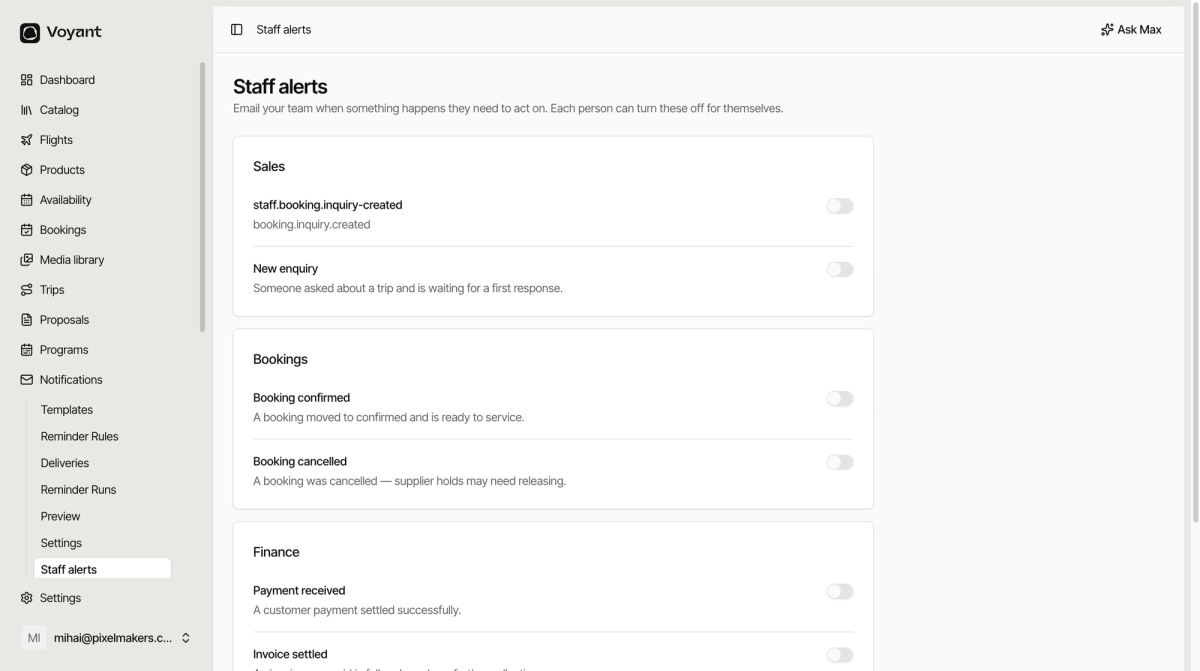
What you can be told about
Sales
- New enquiry, somebody asked about a trip and is waiting for a first response.
Bookings
- Booking confirmed, a booking moved to confirmed and is ready to service.
- Booking cancelled, a booking was cancelled and supplier holds may need releasing.
Finance
- Payment received, a customer payment settled.
- Invoice settled, an invoice was paid in full.
Contracts
- Contract signed, a customer finished signing.
Turning them on
Flip the toggle next to any alert. As the page says, each person can turn these off for themselves, so switching one on here does not force it on everybody.
Which ones are worth it
The useful test is whether somebody has to do something.
- New enquiry is worth it, because a slow first response loses business.
- Booking cancelled is worth it, because supplier holds need releasing.
- Payment received is usually not, unless you are small enough to care about each one. Otherwise it becomes noise people filter out, and then they filter out the important ones too.
Did this answer your question?
Thanks for your feedback.