



Proposal versions: what the customer sees
A version is the snapshot you share. Send it for review, and create a new one each time the plan changes.
The proposal page is your workspace. A version is what the customer actually receives.
Versions matter because plans change. The customer asks for a different hotel, you build v2, and v1 stays on record so you can both see what changed.
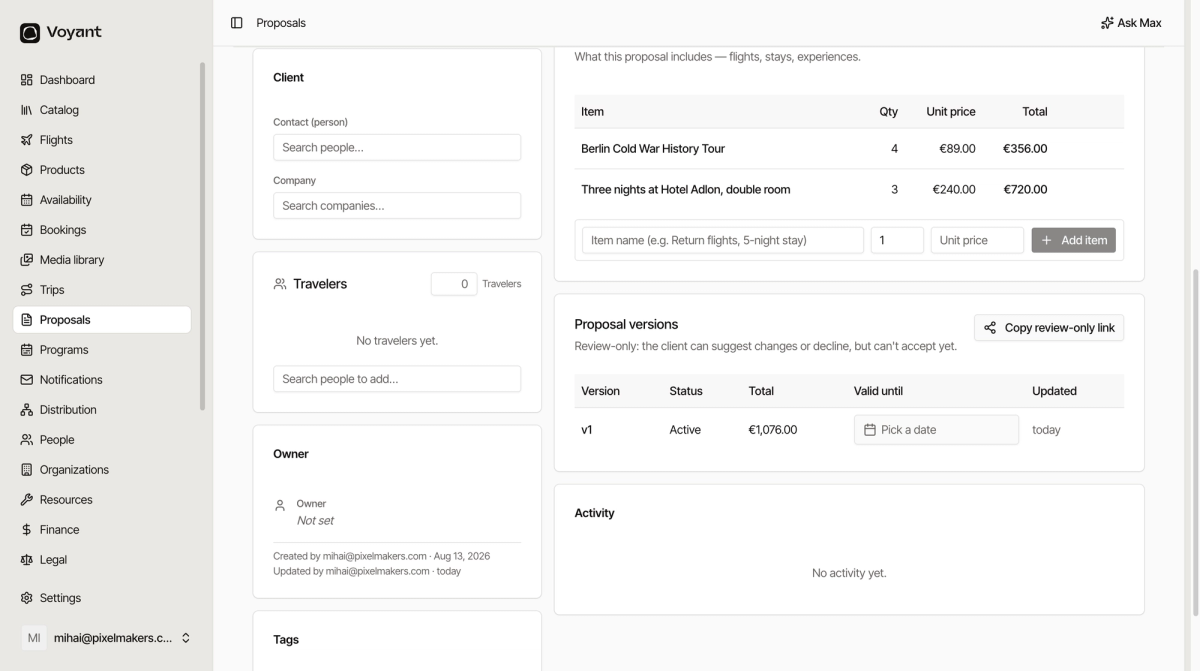
The versions table
- Version is the number, v1, v2 and so on.
- Status shows which one is Active, meaning the one currently on offer.
- Total is what that version came to.
- Valid until is the expiry date. Set one so a quote does not stay live at last season's prices.
- Updated is when it last changed.
Sending it
Use Send for review to share the version with the customer. Once a version exists, the button becomes Copy review-only link, which you can paste into your own email.
Review-only
The panel says it plainly: the client can suggest changes or decline, but cannot accept yet.
So a review link is for gathering feedback, not for closing. When the customer says yes, you move the deal to Won yourself and raise the booking.
Set a validity date
Click Pick a date under Valid until. Prices move, availability moves, and an open-ended quote is a promise you may not be able to keep.
Did this answer your question?
Thanks for your feedback.