



Merging duplicate records
The same person or company entered twice splits their history. Merge combines them into one record.
Duplicates happen. Somebody books once as a.weber@ and once as anneke.weber@, or a colleague adds a company that already existed under a slightly different name.
The result is a split history: half their bookings on one record, half on the other, and neither telling you the truth.
Merge them
- Open either record.
- Click Merge at the top right.
- Choose the record to merge with.
- Confirm.
Merge sits next to Delete on both people and organizations.
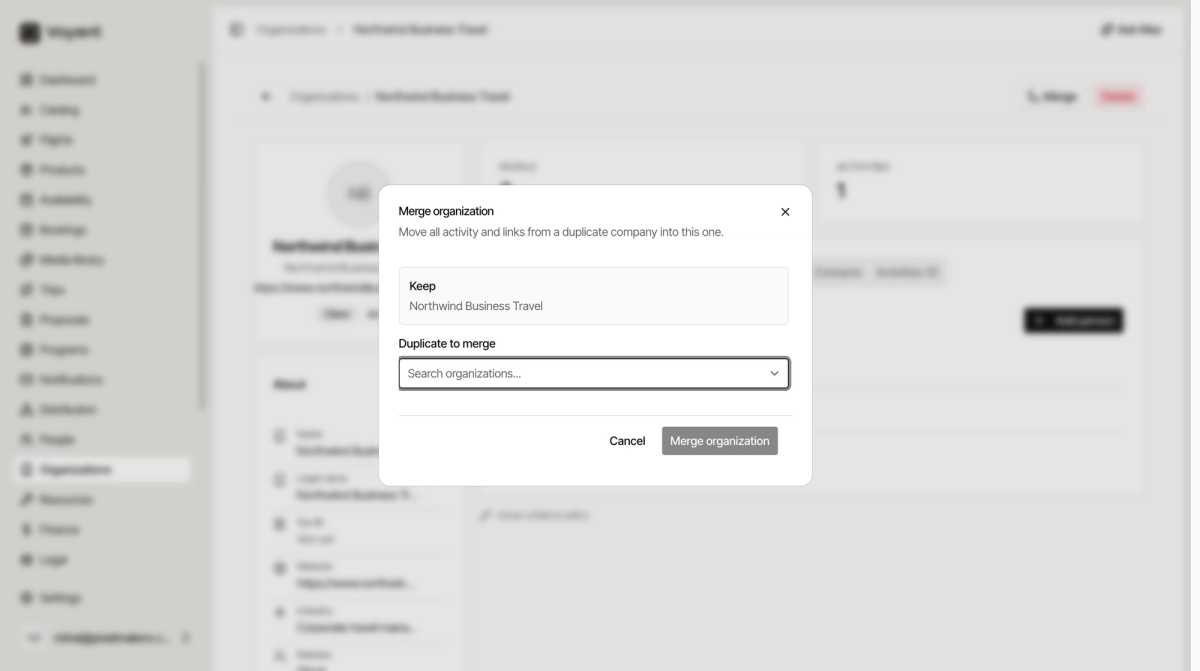
The dialog states what happens: all activity and links move from the duplicate into the record you are keeping.
Merge rather than delete
Deleting a duplicate loses whatever was attached to it. Merging keeps both histories on one record.
If somebody has two records and one has a booking on it, deleting that one takes the booking history with it.
Spotting duplicates
Sort or search by email. Two records with the same email are almost always the same person. Similar names with different spellings are the next thing to look for.
Worth doing occasionally rather than never. Ten minutes a quarter keeps the list trustworthy.
Did this answer your question?
Thanks for your feedback.