



Putting customer details into a message
The curly braces in a template are placeholders. Voyant swaps them for the real booking, traveler and product details when it sends.
A template is written once but sent to hundreds of people. The bits that change per person are written as placeholders in double curly braces.
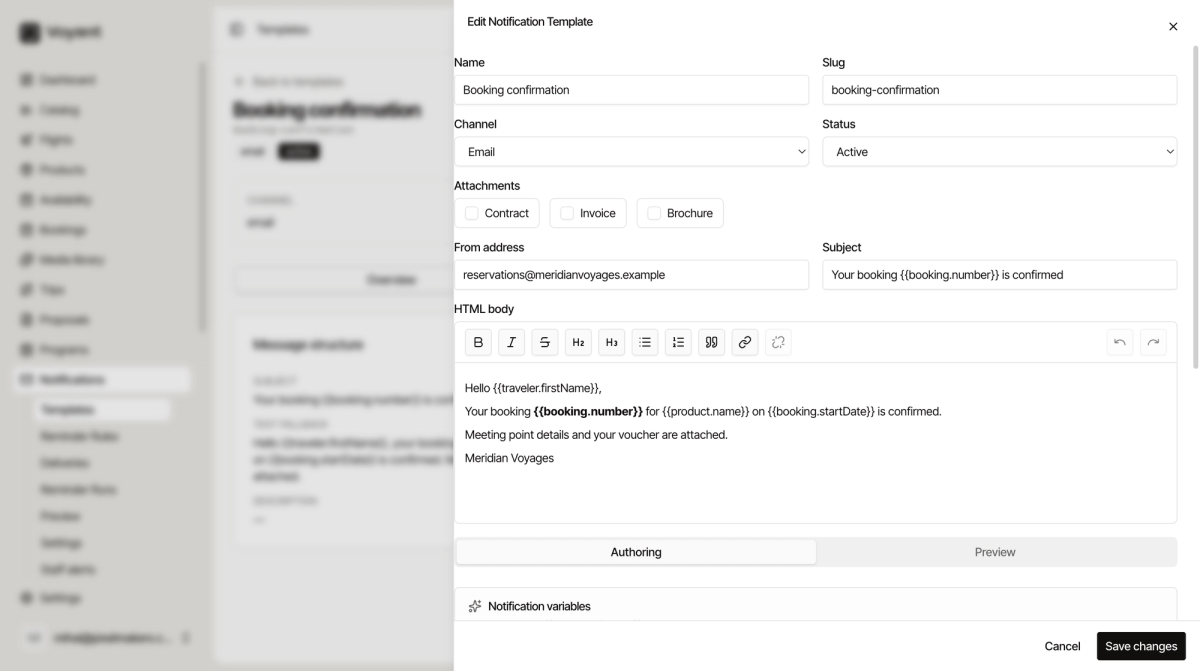
The booking confirmation subject reads:
Your booking {{booking.number}} is confirmed
When it sends to a real customer, that becomes "Your booking BK-2608-231770 is confirmed".
The ones you will use most
{{traveler.firstName}}, the traveler's first name.{{booking.number}}, the booking reference.{{booking.startDate}}, when they travel.{{product.name}}, what they bought.
They follow a pattern: the thing, a dot, then the detail you want from it.
Finding the ones available
Scroll to Notification variables at the bottom of the editor. It lists what you can use, so you do not have to guess or remember.
Attachments
Tick Contract, Invoice or Brochure to attach those documents automatically. That is how the booking confirmation arrives with the voucher already on it.
Writing with them
Type them exactly as shown, including both sets of braces. {{traveler.firstname}} with a lower-case n is not the same field and will not fill in.
Write the sentence so it reads properly once filled. "Hello {{traveler.firstName}}, your booking {{booking.number}} is confirmed" works. "Hello, booking: {{booking.number}}" reads like a machine wrote it, because one did.
Check before you trust it
Use the Preview tab on the template to see it rendered with sample data. A placeholder you have misspelled shows up immediately, either blank or still in braces.
Keep the text fallback in step with the HTML body. If you add a placeholder to one and not the other, some customers get a message missing their details.
Did this answer your question?
Thanks for your feedback.