



Invoices, proformas and credit notes
Three documents that do different jobs. A proforma asks for money, an invoice records the sale, a credit note gives it back.
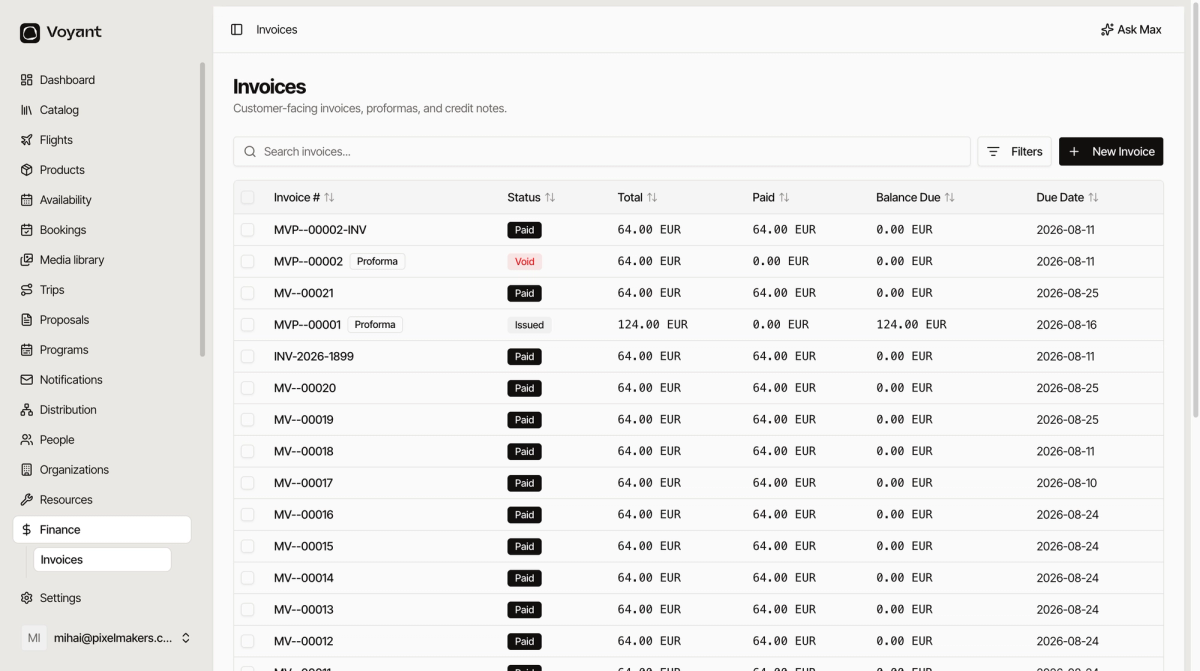
Click Finance, then Invoices. Everything customer-facing lives here.
The three documents
Proforma
A request for payment. It is not a tax document and does not go in your books as a sale.
Use it when somebody needs to pay before you can invoice properly, which is most leisure bookings.
Invoice
The real thing. It records the sale and is what your accountant works from.
Credit note
Cancels part or all of an invoice. This is how you undo a sale rather than deleting the invoice, which you must never do.
Reading the list
- Invoice # carries its own prefix, so
MVP--00002is a proforma andMV--00021an invoice. - Status is where the document has got to.
- Total, Paid and Balance Due are the money.
- Due Date is when you expect settlement.
Sorting by Balance Due is the fastest way to find who owes you.
Statuses
- Issued, sent and awaiting payment.
- Paid, settled in full.
- Void, cancelled. A voided proforma is normal once it has been converted into a real invoice.
Where they come from
Most raise themselves from bookings. You can also click New Invoice here, or raise one from the booking itself. See Invoices and Documents on a booking.
Did this answer your question?
Thanks for your feedback.