



Departures and recurring schedules
A departure is one dated instance a customer can book. A recurring schedule generates them for you so you do not add each one by hand.
A product with no dates cannot be sold. Dates come in two forms.
A departure is one dated instance
A departure is your tour on Sunday 16 August at 10:00. It has its own start, end, duration, status and capacity.
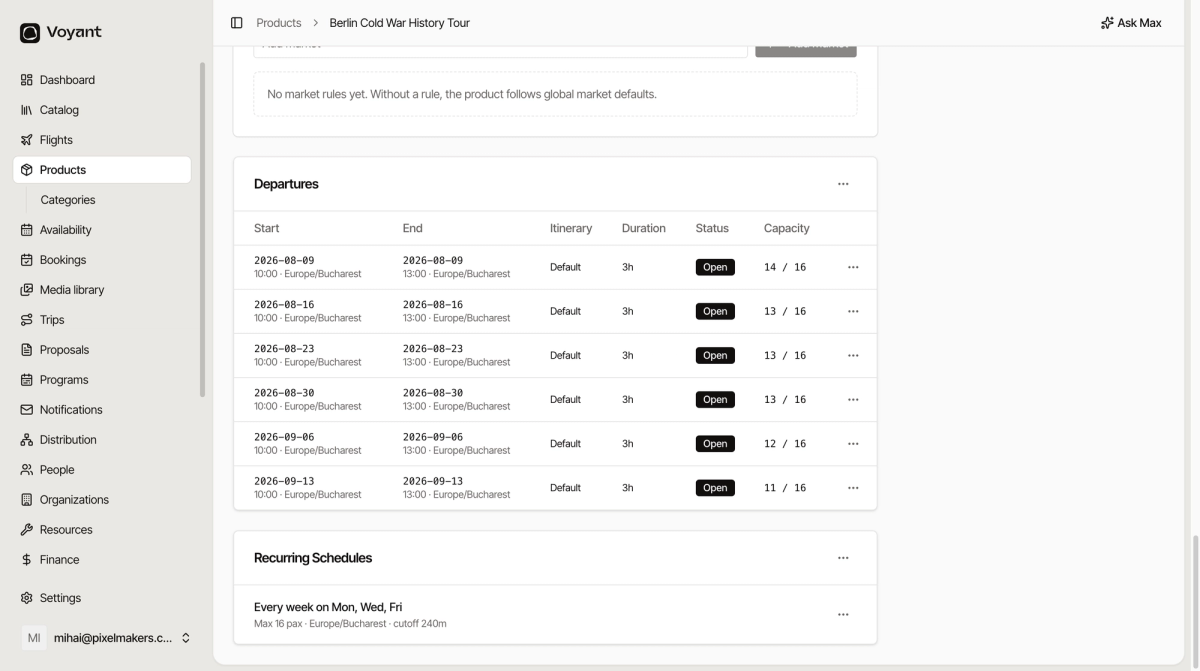
Reading the table:
- Start and End show the date and time, with the timezone.
- Itinerary shows which day plan it runs, usually Default.
- Duration is how long it lasts.
- Status is Open when it can be sold.
- Capacity shows places left against the total, so "13 / 16" means three are sold.
A recurring schedule generates departures
You would not add three departures a week by hand for a year. Instead you write the pattern once.
A schedule reads like a sentence: "Every week on Mon, Wed, Fri, max 16 pax, Europe/Bucharest, cutoff 240m".
- Open the product and scroll to Recurring Schedules.
- Create a rule with the days it runs and the start time.
- Set the maximum number of people.
- Set the timezone. Use the local time where the tour happens.
- Set a cut-off in minutes, so bookings close before departure.
- Save. Voyant generates the individual departures.
Stopping a single date
To close one date without touching the schedule, use the menu at the end of that departure row. Useful for a public holiday or a day the boat is being serviced.
Products with no departures
Open-dated vouchers do not have departures at all, because the customer never picks a date. That is expected. See Set up an open-dated ticket.
Did this answer your question?
Thanks for your feedback.