



Customise your pipeline stages
Rename stages, add your own, and set the win probability each one carries.
The six default stages suit most operators. If your process is different, change them.
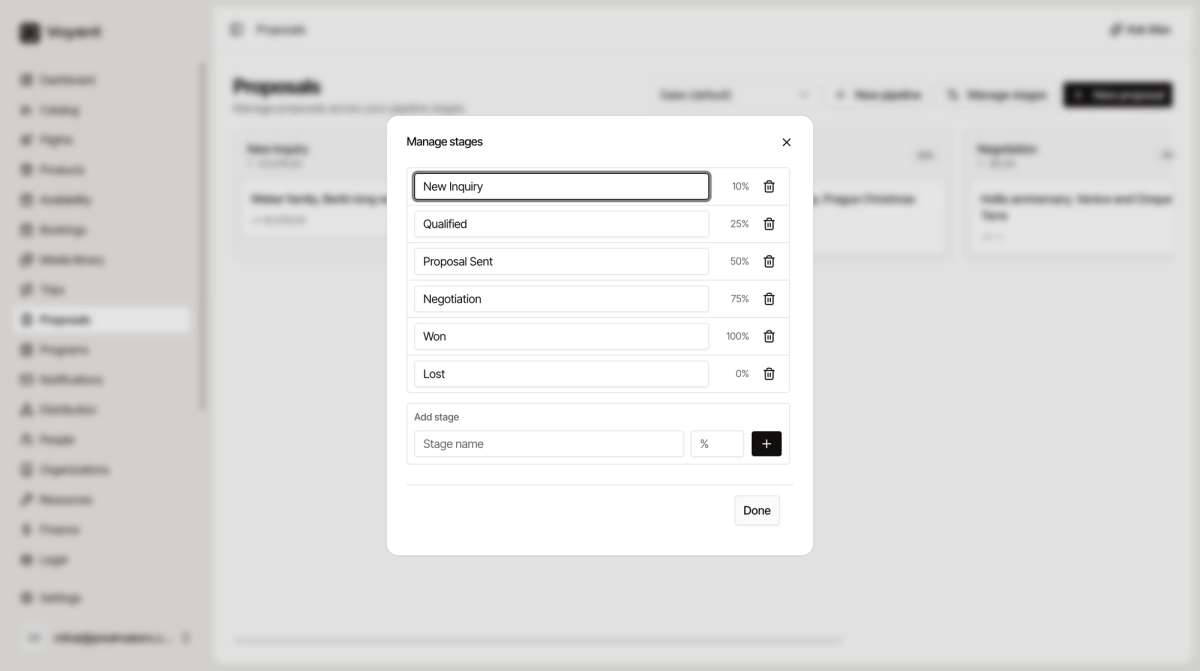
Edit the stages
- On the Proposals board, click Manage stages.
- Type over any stage name to rename it.
- Use the bin icon to remove one.
- Under Add stage, type a name and a percentage, then click the plus.
- Click Done.
Setting probabilities
The percentage is how likely a deal in that stage is to close. It should climb as the conversation progresses.
The defaults are a sensible ladder: 10, 25, 50, 75, then 100 for Won and 0 for Lost.
Keep Won at 100 and Lost at 0. Those two anchor everything else.
Adding a stage
Add one when your process has a real step the defaults miss. A tour operator waiting on supplier confirmation before quoting might add "Checking availability" at 35 percent, between Qualified and Proposal Sent.
Resist adding too many. Six columns fit on a screen and each extra stage is another place for a deal to sit and be forgotten.
Separate pipelines
If two parts of your business genuinely work differently, use New pipeline rather than stretching one set of stages to cover both.
Did this answer your question?
Thanks for your feedback.