



Connect a payment processor
Before you can take a card you need a processor connected. Pick one, connect it, make it the default.
Click Settings, then Payments.
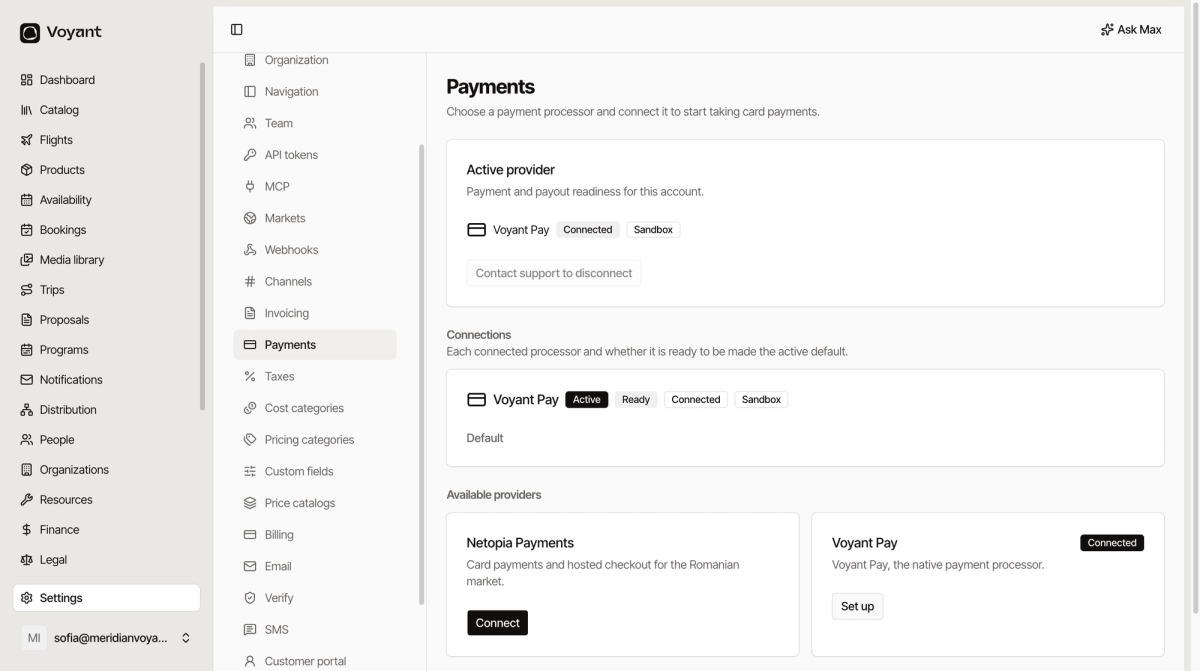
The three panels
- Active provider, which processor is currently taking your card payments, and whether it is ready.
- Connections, every processor you have connected and whether each could be made the default.
- Available providers, what you can connect.
Connect one
Find the provider under Available providers and click Connect or Set up. You are taken through that provider's own onboarding, which asks for your company and bank details, because they are the ones paying money into your account.
Once it reports Ready, mark it Default to make it the one customers actually use.
The choices
- Voyant Pay, the built-in processor. Nothing extra to sign up for.
- Netopia Payments, card payments and hosted checkout for the Romanian market.
Sandbox and live
A connection marked Sandbox is in test mode. Real cards will not work, and nothing reaches your bank. That is what you want while you are setting up, and what you must change before you sell anything.
More than one connection
You can have several connected, but only one is Active at a time. Keeping a second one ready is useful if you ever need to switch quickly.
Disconnecting
The active provider cannot be removed from this screen. Contact support, so nobody accidentally leaves the business unable to take money.
Did this answer your question?
Thanks for your feedback.