



Your booking engine
Branded booking pages you can link to from your own website, with your own domain and your own choice of what is bookable.
The booking engine is a set of booking pages Voyant hosts for you, wearing your branding. You link to them from your website and take bookings without building anything.
Click Settings, then Booking engine. There are four tabs.
Overview
Your Engine address, ready to copy. Send shoppers there or link to it from your site.
What you sell
Tick what shoppers may book. This is the tab worth reading carefully, because it tells you the truth about what is supported.
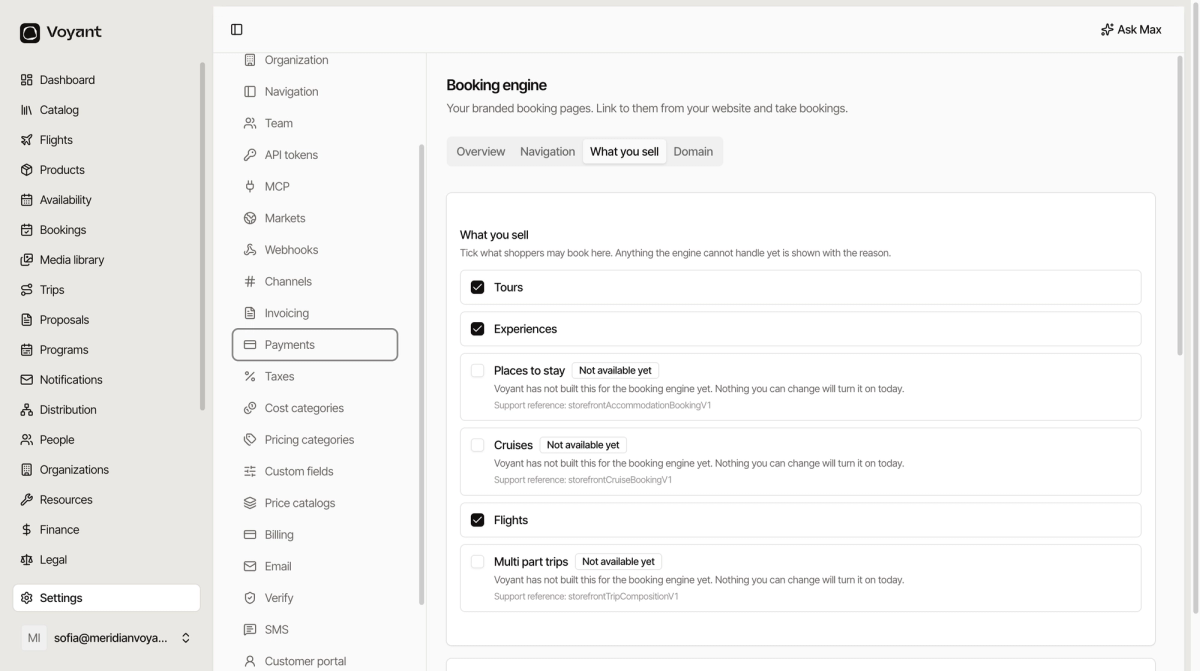
Anything the engine cannot handle is marked Not available yet, with the reason spelled out: "Voyant has not built this for the booking engine yet. Nothing you can change will turn it on today."
At the time of writing that covers Places to stay, Cruises and Multi part trips. If you sell those, take them by phone, by proposal or through your own site for now.
Further down the same tab, How shoppers pay lets you pick every payment method you accept. Shoppers only see the ones you tick.
Navigation
Navbar links and Footer links add your own pages to the engine header and footer, so a shopper can get back to your main site.
Each link needs a URL starting with https:// and a label per language. Links for your website gives you ready-made addresses to paste into your site builder.
Domain
You start on an address like yourname-book.onvoyant.net, which always works. Add your own domain, such as book.example.com, and it looks like part of your site.
- Enter the Custom domain and click Save domain.
- Add the DNS record it shows you, or send it to whoever runs your DNS.
- Wait for it to verify.
Did this answer your question?
Thanks for your feedback.