



Alt text and translations
Alt text describes a picture for people who cannot see it. It is quick to write, it helps your search ranking, and Voyant can hold it in several languages.
Alt text is a short description of a picture. Screen readers read it aloud, and it shows if the image fails to load.
It is the single most useful thing you can add to a file, and it takes about ten seconds.
Add it
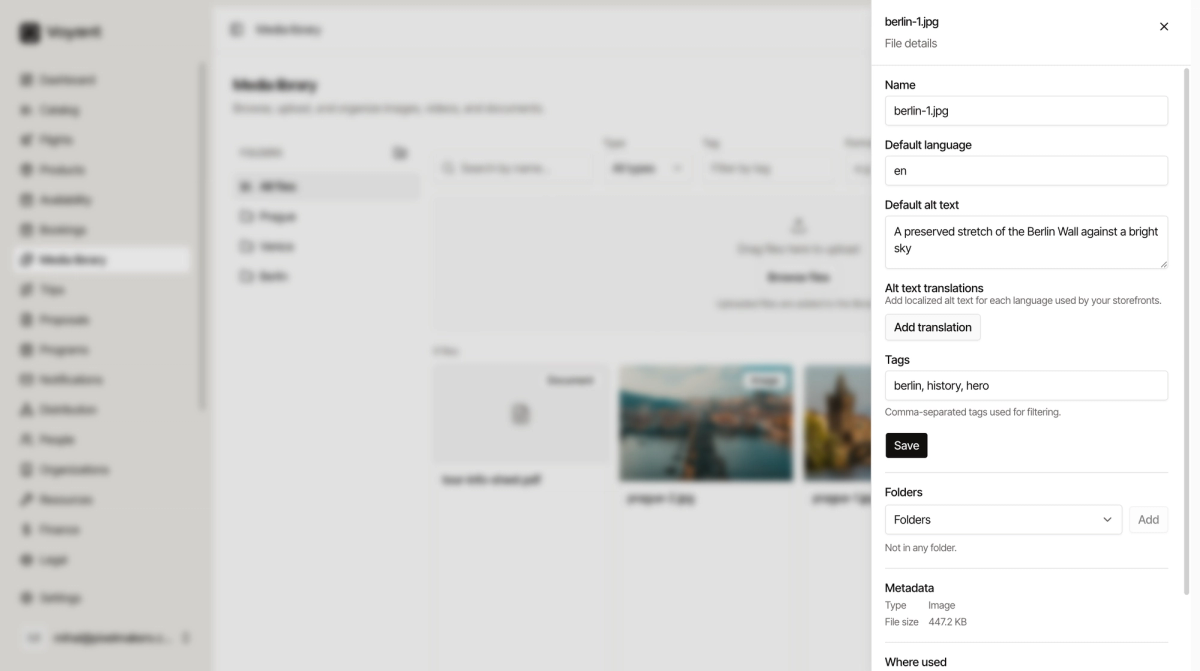
- Open Media library and click a file.
- Type into Default alt text.
- Click Save.
Writing good alt text
Describe what is in the picture, plainly, as if to someone on the phone.
- Good: "A preserved stretch of the Berlin Wall against a bright sky".
- Good: "Gondolas passing under the Rialto Bridge at sunset".
- Poor: "image", "photo1", "berlin".
- Poor: stuffing it with keywords. It helps nobody and search engines see through it.
One clear sentence is plenty. There is no need to write "image of" or "photo of", because that is already understood.
Other languages
Default language is the language your alt text is written in, usually en.
If your storefronts run in more than one language, click Add translation and write the alt text again in each. A Romanian visitor then hears the Romanian description.
Only bother with this for languages you actually sell in.
Renaming
The Name field at the top renames the file inside Voyant. Useful when you inherited a library full of IMG_4471.jpg.
Did this answer your question?
Thanks for your feedback.