



What the Legal section is for
Contracts, templates, policies and numbering in one place, so the paperwork keeps up with the selling.
Selling a trip creates an agreement whether you write one or not. The Legal section is where you make that agreement explicit and keep a copy.
Click Legal in the left menu. It has four screens.
- Contracts, every agreement you have with customers, suppliers and partners.
- Contract Templates, the reusable wording each contract is built from.
- Policies, cancellation terms, payment terms, booking conditions and privacy notices.
- Number Series, how contracts get their reference numbers.
Read it as a chain
A template holds the wording. A contract is one filled-in copy of that wording for one customer or supplier. A policy is a standing rule the contract refers to. A number series gives each contract its reference.
Most contracts write themselves
When a booking is confirmed, Voyant raises the customer sales agreement from the default template, numbers it from the right series, and links it to the booking and the traveller.
You will spend far more time reading contracts here than creating them.
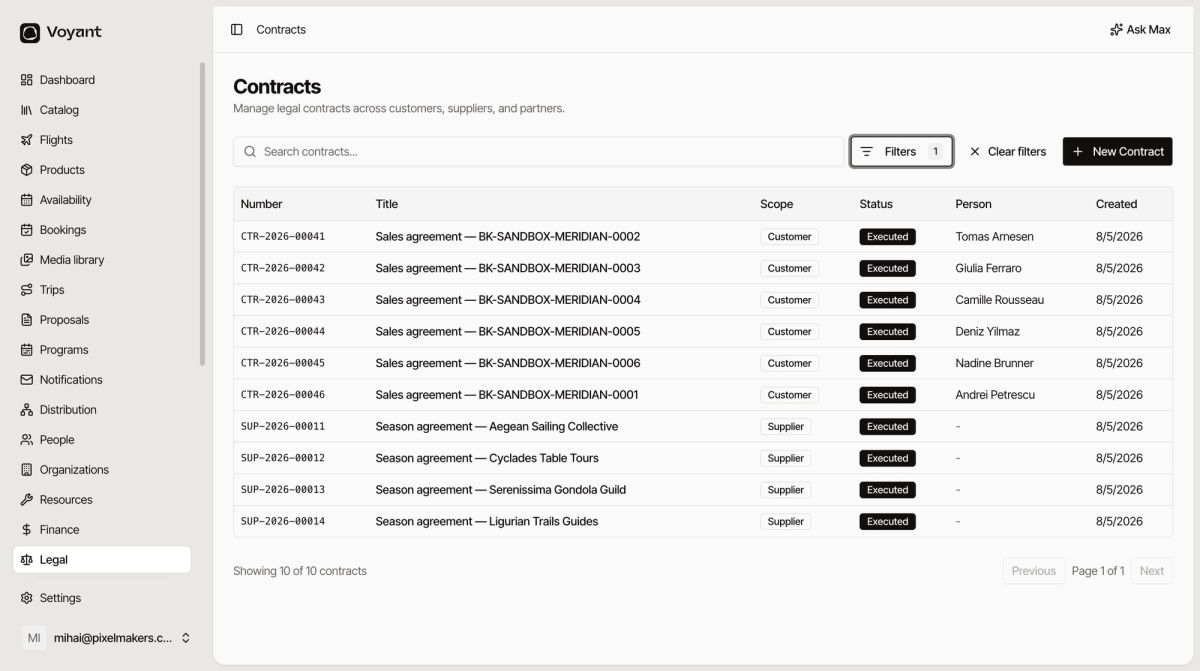
The list
- Number is the reference, such as
CTR-2026-00043. - Title usually names the booking it covers.
- Scope is Customer, Supplier, Partner, Channel or Other.
- Status is where it has got to.
- Person is the customer, empty for supplier agreements.
Filters narrows by scope, status or person. Filtering by status is how you find everything still sitting in Draft.
Did this answer your question?
Thanks for your feedback.