



Tax classes and regimes
A class says what kind of thing you are selling. A regime says what tax applies. Rules pick between them automatically.
Travel has awkward VAT. Accommodation is often reduced-rate, packaged travel may fall under a margin scheme, and a VAT-registered business in another EU country pays nothing at all.
Click Settings, then Taxes.
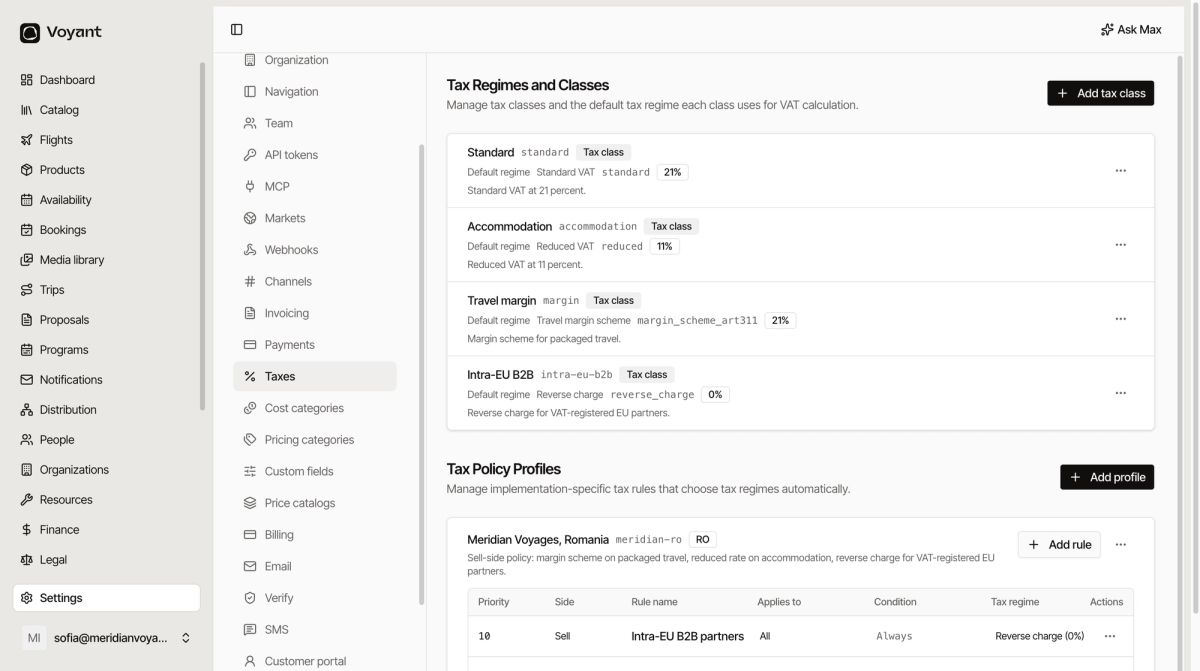
Classes and regimes
A tax class describes what you are selling. A tax regime is the treatment applied. Each class has a default regime.
In the example above:
- Standard uses Standard VAT at 21%.
- Accommodation uses Reduced VAT at 11%.
- Travel margin uses the margin scheme for packaged travel.
- Intra-EU B2B uses reverse charge at 0%.
You tag a product with a class. The class decides the tax. That is the whole idea.
Tax policy profiles
Sometimes the right regime depends on the sale, not just the product. A profile holds rules that decide automatically.
Each rule has a Priority, a Side (sell or buy), what it Applies to, a Condition, and the Tax regime it selects.
Rules run in priority order
Lower numbers win. Reading the example profile top to bottom:
- Priority 10: if the customer is an intra-EU B2B partner, use reverse charge at 0%. Always.
- Priority 20: if the sale has accommodation and the accommodation is in Romania, use reduced VAT at 11%.
- Priority 100: otherwise, standard VAT at 21%.
The first rule that matches wins, so the specific cases sit at the top and the catch-all sits at the bottom.
Always keep a catch-all
The last rule should apply to everything, with a condition of Always. Without it, a sale that matches nothing has no tax treatment.
Did this answer your question?
Thanks for your feedback.