



Supplier contracts
Record what you agreed, when it runs from and to, and when it needs renewing, so nobody sells against expired terms.
A contract is the agreement behind a supplier: what they charge you, on what terms, for how long.
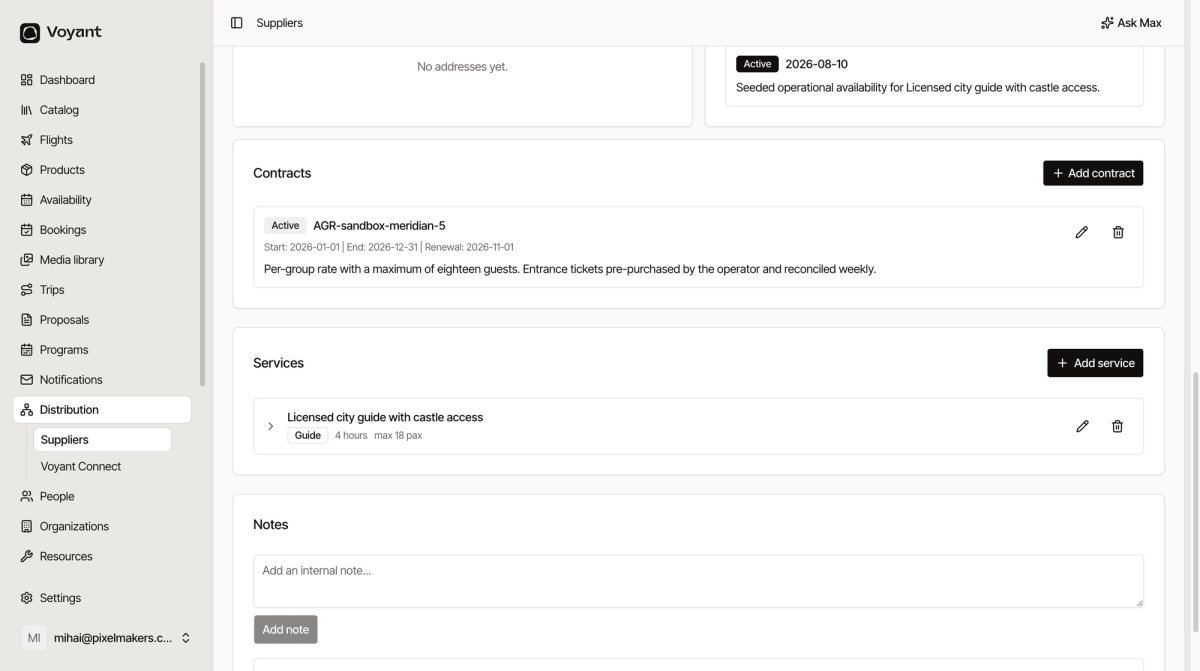
Add a contract
- Open the supplier and find Contracts.
- Click Add contract.
- Give it a reference, such as
AGR-sandbox-meridian-5. - Set Start and End.
- Set the Renewal date.
- Describe the terms.
The three dates
- Start is when it takes effect.
- End is when it stops.
- Renewal is when you have to decide, which is earlier than the end.
The renewal date is the useful one. A contract ending on 31 December with a renewal date of 1 November tells you when to start the conversation, not when the problem arrives.
Describe the terms in plain words
The description is where the commercial reality goes. Something like "Per-group rate with a maximum of eighteen guests. Entrance tickets pre-purchased by the operator and reconciled weekly" tells a colleague exactly how the money works.
Write it so somebody who has never spoken to that supplier can price a booking correctly.
Why bother
Two reasons. You need to know your cost to know your margin, and you need to know when terms lapse so you are not quoting last year's rate in February.
Did this answer your question?
Thanks for your feedback.