



Product tags
Free-form labels for everything a family does not capture: Half day, Wine, Family friendly, Skip the line.
A family says what kind of thing a product is. A tag says everything else about it.
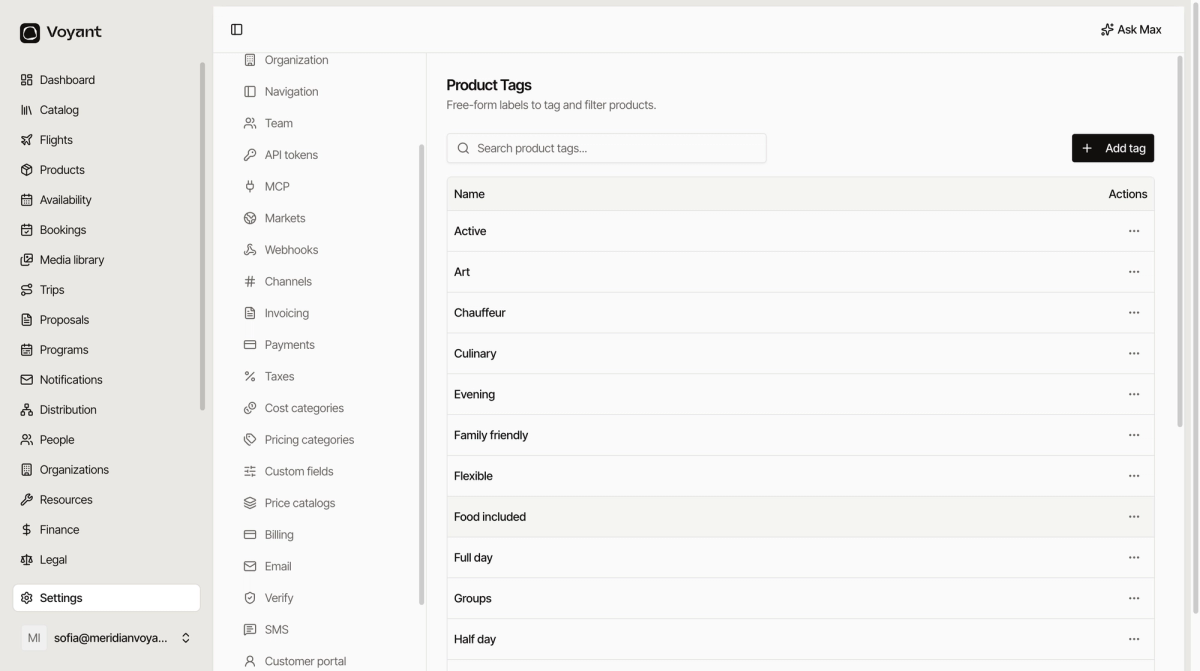
Click Settings, then Product tags.
What tags are for
Three jobs, in order of how much they earn their keep.
- Filtering your own catalog. With two hundred products, "show me the half-day food ones" is how you find anything.
- Filtering on your website. Shoppers browse by theme far more than by family.
- Reporting. Which themes actually sell.
Add one
Click Add tag, type a name, save. There is nothing else to configure, which is the point.
What makes a good tag
Look at the example list. It groups into a few kinds:
- Duration: Half day, Full day, Short break.
- Time of day: Morning, Evening, Sunset.
- Theme: Culinary, Heritage, History, Art, Wine, River.
- Audience and style: Family friendly, Small group, Private, Groups, Hands on.
- Practical: Skip the line, Food included, Flexible, Private hire.
Consistent, reusable, and each one describes many products.
What makes a bad tag
Anything that applies to one product, changes every season, or duplicates a field you already have.
"Summer 2027 campaign" is not a tag, it is a promotion. "Bucharest" is not a tag if you already record a destination. "Tour" is not a tag because it is a family.
Agree on wording
"Family friendly", "Family-friendly" and "Families" are three tags to the system and one idea to a human. Decide the wording once and keep the list short enough that people scroll it instead of inventing.
Did this answer your question?
Thanks for your feedback.