



Invoice number series
Automatic, sequential numbering for invoices, proformas and credit notes, which most tax authorities require.
Invoice numbers cannot be arbitrary. Most tax regimes require them to run in an unbroken sequence, and Voyant handles that for you.
Click Finance, then Number Series.
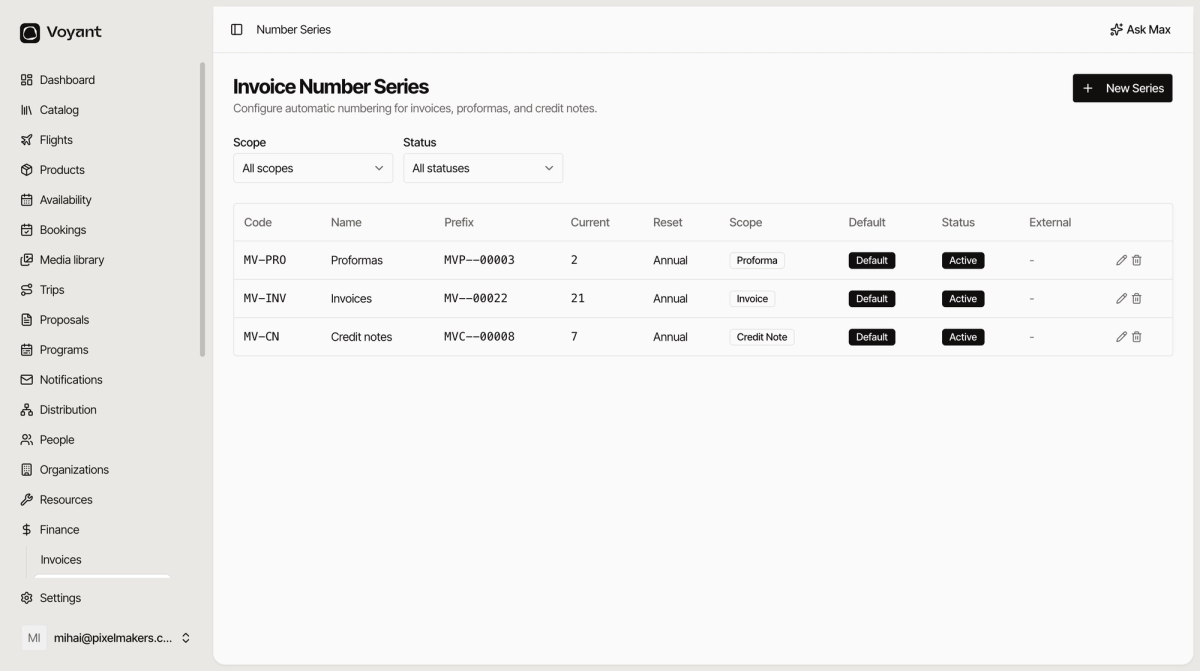
The columns
- Code and Name identify the series.
- Prefix is the pattern, such as
MVP--00003. - Current is the number reached so far.
- Reset is when the counter starts again, usually Annual.
- Scope says which document type it numbers.
- Default marks the series used when nothing more specific applies.
- Status must be Active for it to issue numbers.
One series per document type
Proformas, invoices and credit notes each get their own, so the prefix tells you what you are looking at without opening it.
Annual reset
Most operators reset the counter each year, so numbering restarts at 1 every January. That is the default and matches how most accountants expect to see it.
Changing a series
Click the pencil to edit. Take care with the prefix and current number on a series already in use: changing them mid-year can produce duplicates or gaps.
If you need a different pattern, the safest moment is the start of a financial year.
Did this answer your question?
Thanks for your feedback.