



Granting and requesting inventory access
Let a partner sell your products, or ask another operator for access to theirs, with scopes, markets and an expiry date.
Having a profile is only the introduction. Access grants are what actually let a partner sell your inventory.
Open Voyant Connect and use the three tabs.
Requests
Incoming access requests are other operators asking to sell your products. Approve the ones you want to trade with.
Partners
This is where you grant access yourself.
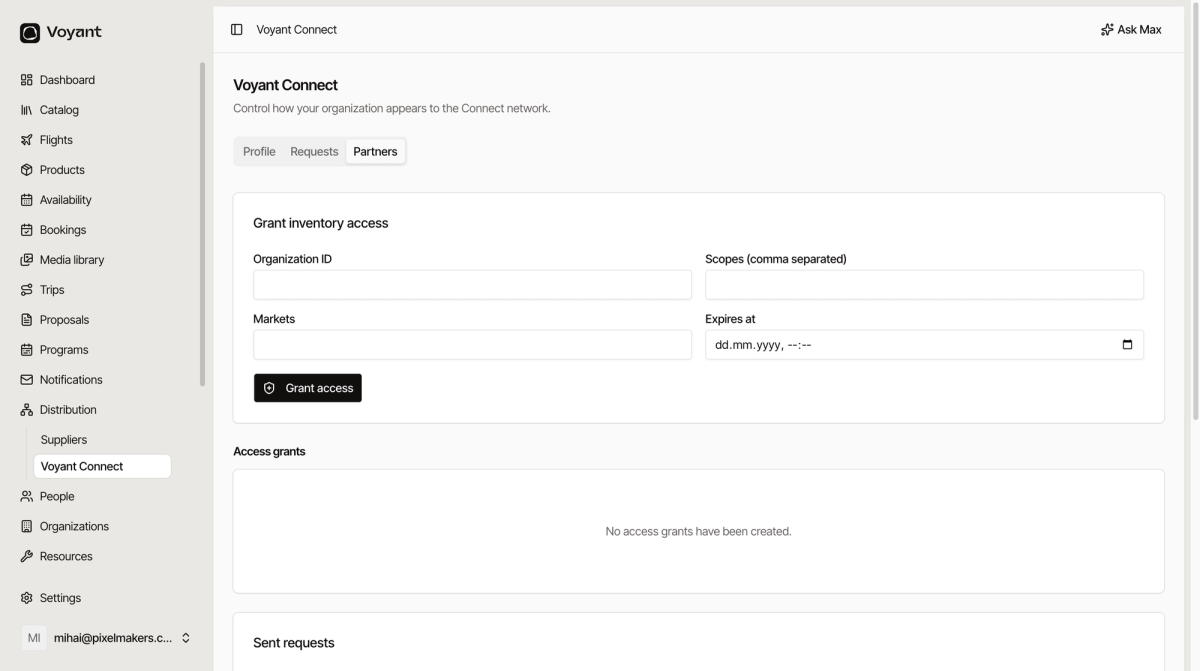
- Enter the partner's Organization ID.
- Set the Scopes, comma separated, controlling what they may see and do.
- Set the Markets the grant covers.
- Set Expires at.
- Click Grant access.
Existing grants appear under Access grants, and anything you have asked of others under Sent requests.
Always set an expiry
A grant without an end date is a standing permission nobody revisits. Dating it forces a conversation once a year about whether the partnership is still worth having.
Scope it narrowly
Grant what the partner needs to sell, not everything you have. It is easier to widen a grant later than to explain why a partner saw pricing they should not have.
The other direction
Inventory you have been granted access to appears in Catalog, alongside your own products, with a SOURCE filter showing where each result came from.
See Products and Catalog.
Did this answer your question?
Thanks for your feedback.