



Customise the menu
Hide the parts of Voyant you do not sell, for yourself or for everybody.
Voyant covers tours, cruises, flights, accommodation, events and transport. Most operators do not sell all of them, and the menu is shorter when it only lists what you do.
Click Settings, then Navigation.
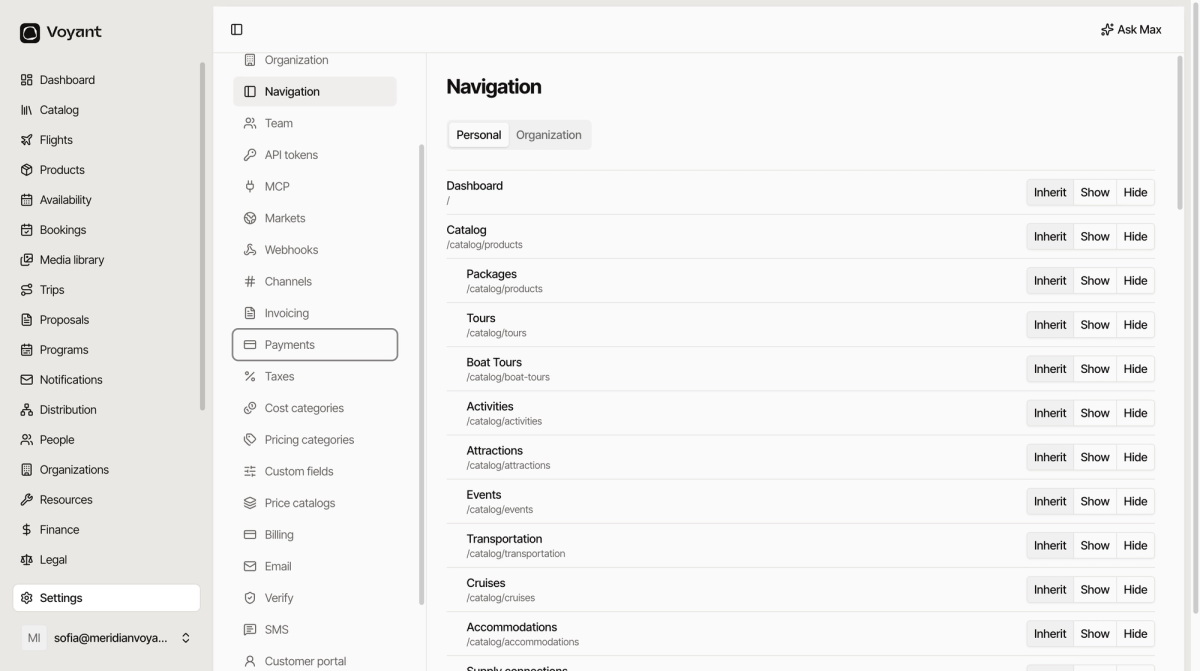
Personal and Organization
Organization sets what everybody sees. Personal overrides it for you alone.
Use Organization to hide Cruises because you do not sell cruises. Use Personal to hide Finance because you never touch it, even though your colleague does.
The three choices
- Inherit, follow whatever is set above. On the Personal tab that means the organization setting.
- Show, always visible.
- Hide, never visible.
Leave things on Inherit unless you have a reason. It keeps the number of decisions you are maintaining small.
Hiding is not removing
A hidden section still works. Its data is untouched, and anyone with the direct address can still open it. This tidies the menu, it does not control permissions.
For real access control, use roles under Team.
Did this answer your question?
Thanks for your feedback.