



Travelers: the payer and the people going
Two separate things on one tab. Who gets the invoice, and who actually travels.
Voyant Support
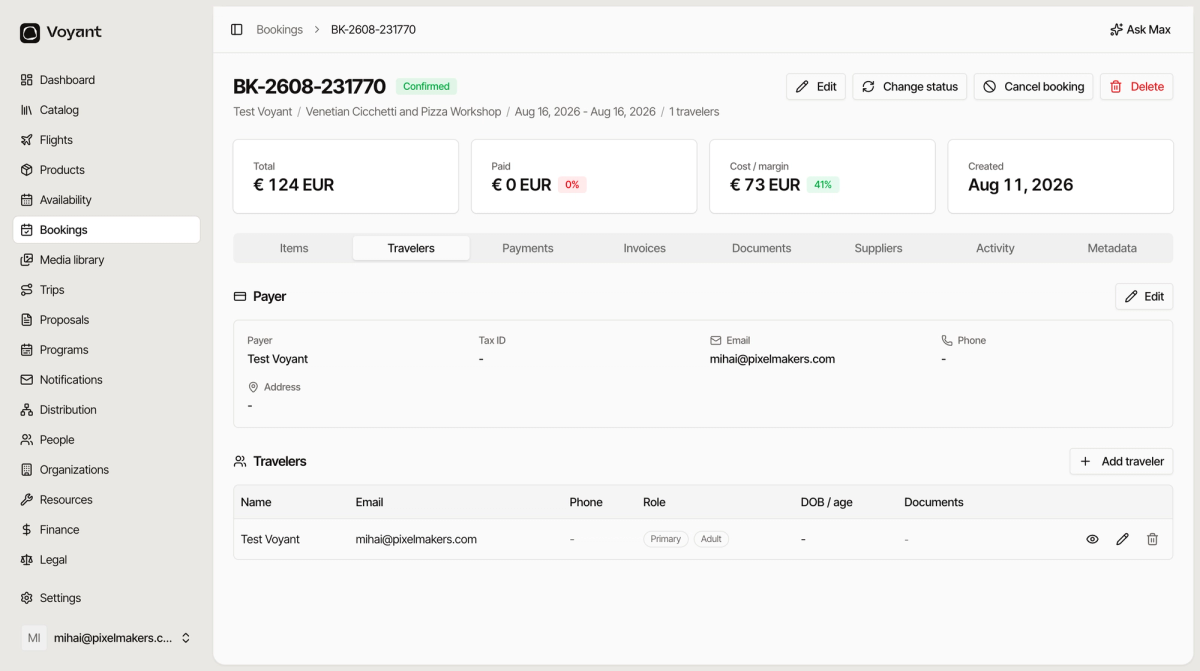
This tab holds the people, split into two.
Payer
Who is billed. Name, tax ID, email, phone and address.
The tax ID matters for company bookings, because it goes on the invoice. Click Edit Payer to correct it.
Travelers
Who is going. Each row has:
- Name, which suppliers and manifests need.
- Email and Phone for reaching them on the day.
- Role, where Primary marks the main contact.
- DOB / age, needed when pricing depends on age or a supplier requires it.
- Documents, such as a passport where the trip needs one.
Click Add traveler to add someone, for example when a booking was made for two but only one name was given.
The same names appear on the departure, grouped by date rather than by booking. See Travelers on a departure.
Did this answer your question?
Thanks for your feedback.