



Adjust capacity on one date
Change how many places a single date has, without touching the schedule or any other date.
Voyant Support
Sometimes one date is different. A bigger coach, a smaller guide team, a group that booked the back half of the boat.
Steps
- Find the row and click Edit.
- Change Initial Pax or Remaining Pax.
- Click Save Slot.
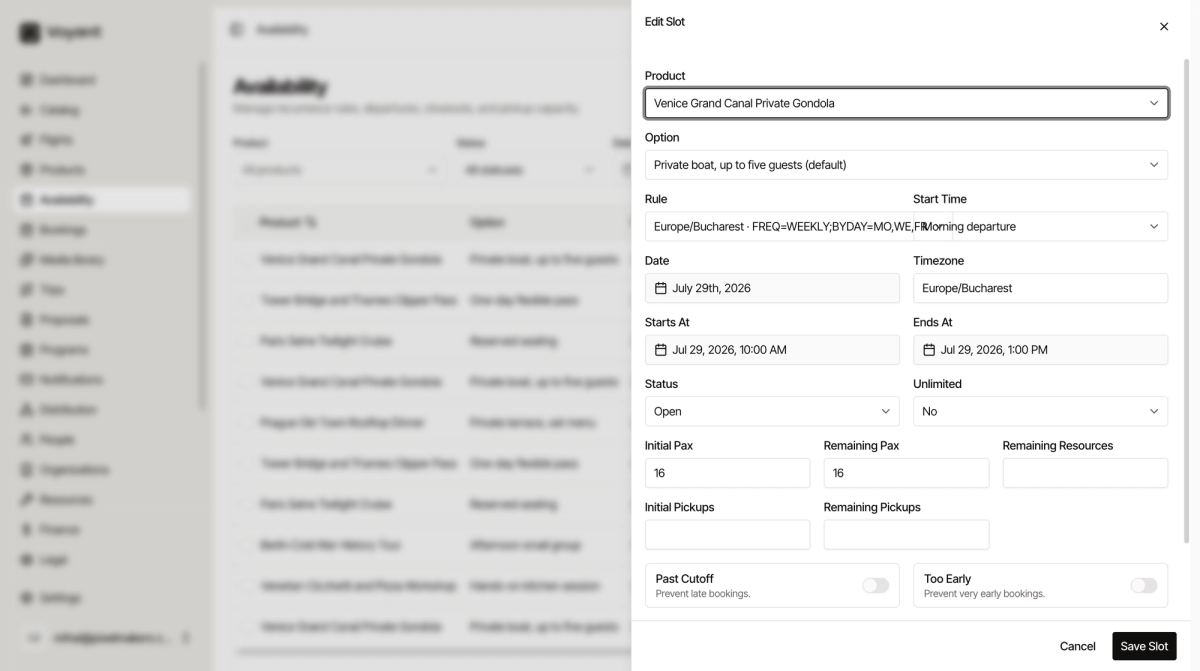
The fields that matter
- Initial Pax is what the date started with. Raise it if you have a larger vehicle that day.
- Remaining Pax is what is still free. Lower it to hold places back for a group.
- Unlimited removes the limit entirely for this date. Use it rarely, and only when you truly cannot run out.
- Past Cutoff prevents late bookings, so nobody books ten minutes before departure.
- Too Early prevents very early bookings.
- Notes is for your team. Customers never see it.
Fields you can usually ignore
Rule, Start Time and Timezone come from the product schedule and are shown so you know where the date came from. Remaining Resources and the pickup fields only apply if you use vehicles or pickup points.
Did this answer your question?
Thanks for your feedback.