



Template variables
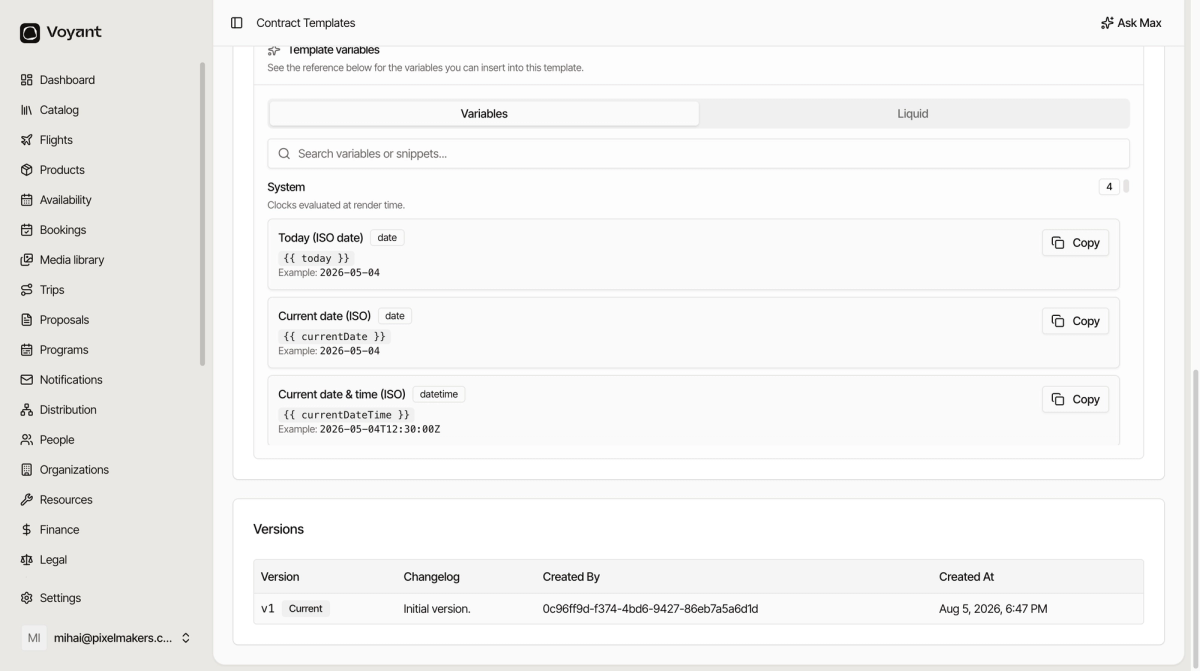
The built-in reference lists every blank you can drop into a template, with a Copy button on each.
You do not need to memorise the placeholder names. Every template page carries a reference to the ones it can use.
Open a template and scroll to Template Variables & Liquid.
How to use it
- Search for what you want, such as "total" or "traveller".
- Click Copy on the one you need.
- Paste it into the template body where the value should appear.
The Example line under each one shows what it will produce, so you can tell {{ today }} from {{ currentDateTime }} without guessing.
The groups
Variables are grouped by where the value comes from.
- System, today's date and time.
- Contract, the number, issue date, status and series.
- Booking, the reference, dates, guest count and total.
- Customer and Lead traveler, names and contact details.
- Travelers loop and Pricing items loop, for lists that repeat.
- Product, Departure slot, Sailing and Accommodation stay, the thing being sold.
- Payment and Payment schedule loop, what is owed and when.
- Operator, your own company details from Settings.
- Acceptance, captured when a customer ticks Accept online.
The Liquid tab
Next to Variables sits Liquid, a set of ready-made snippets for the trickier cases: a fallback when a value is missing, a date in a specific language, a table of line items, a list that repeats.
Copy the snippet and change the wording around it. You do not need to understand the syntax to use them.
Operator details come from Settings
Your company name, address, licence number and bank details are pulled from your organization settings, not typed into the template. Fill those in once and every contract picks them up.
Did this answer your question?
Thanks for your feedback.