



Create a program
Set the type, the dates, the destination and how many people you expect. Everything else is added as the event takes shape.
Voyant Support
Steps
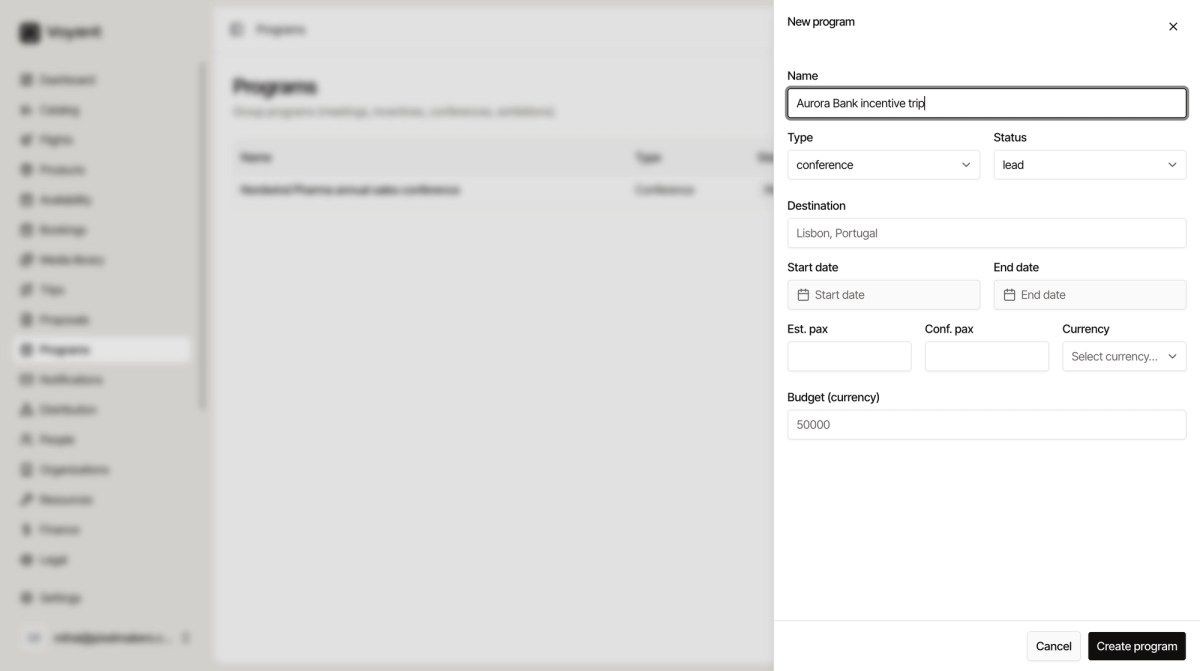
- Click Programs, then New program.
- Give it a Name you will recognise, such as "Nordwind Pharma annual sales conference".
- Choose the Type: Meeting, Incentive, Conference, Exhibition or Other.
- Set the Status, usually Lead at the start.
- Type the Destination.
- Set the Start date and End date.
- Enter Est. pax and, once you know it, Conf. pax.
- Choose the Currency and enter the Budget.
- Click Create program.
Estimated and confirmed headcount
These two numbers matter more than they look.
- Est. pax is what the client thinks they will bring. It is what you plan and quote against.
- Conf. pax is how many have actually confirmed. It is what you commit inventory against.
A conference quoted for 120 that confirms 96 is normal. Watching the gap between the two is most of the job.
The budget
Set the client budget here at the start. It gives you something to hold your sourcing against, so you know whether a venue quote is affordable before you take it back to the client.
Did this answer your question?
Thanks for your feedback.